cancel
Showing results for 
Search instead for 
Did you mean: 

We've captured the moments from FabCon & SQLCon that everyone is talking about, and we are bringing them to the community, live and on-demand. Starts on April 14th. Register now

Reply
Syndicate_Admin
Administrator
Administrator

Difference of date and time in the same column but with condition.

Dear: I have reviewed all the posts to look for the solution and I have combined solutions that use MAX, MIN, EARLY etc and do not find the solution, the problem is as follows:

The table consists of 2 columns, INCIDENT_NUMBER is the number of the event, and the FECHA_HORA are the events that were logged with its date and time.

Objective: I need to be able to add up every minute that EVERY RECORD has.

power bi.png

Please if you can guide me to how to do it.

Best regards.

1 ACCEPTED SOLUTION
Anonymous
Not applicable

Hi @Syndicate_Admin 


It's a DAX column


Vera_33_0-1617022160347.png


And a measure

Vera_33_1-1617022204029.png

Measure = 
VAR MinDate = MIN(Incident_table[FECHA_HORA])
VAR MaxDate = MAX(Incident_table[FECHA_HORA])
RETURN
DATEDIFF(MinDate,MaxDate,MINUTE)
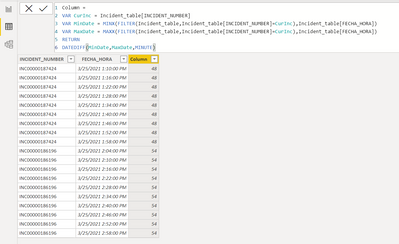
Column = 
VAR CurInc = Incident_table[INCIDENT_NUMBER]
VAR MinDate = MINX(FILTER(Incident_table,Incident_table[INCIDENT_NUMBER]=CurInc),Incident_table[FECHA_HORA])
VAR MaxDate = MAXX(FILTER(Incident_table,Incident_table[INCIDENT_NUMBER]=CurInc),Incident_table[FECHA_HORA])
RETURN
DATEDIFF(MinDate,MaxDate,MINUTE)


View solution in original post

5 REPLIES 5
Anonymous
Not applicable

Hi @Syndicate_Admin 


It's a DAX column


Vera_33_0-1617022160347.png


And a measure

Vera_33_1-1617022204029.png

Measure = 
VAR MinDate = MIN(Incident_table[FECHA_HORA])
VAR MaxDate = MAX(Incident_table[FECHA_HORA])
RETURN
DATEDIFF(MinDate,MaxDate,MINUTE)
Column = 
VAR CurInc = Incident_table[INCIDENT_NUMBER]
VAR MinDate = MINX(FILTER(Incident_table,Incident_table[INCIDENT_NUMBER]=CurInc),Incident_table[FECHA_HORA])
VAR MaxDate = MAXX(FILTER(Incident_table,Incident_table[INCIDENT_NUMBER]=CurInc),Incident_table[FECHA_HORA])
RETURN
DATEDIFF(MinDate,MaxDate,MINUTE)


Thank you very much for your help, there I was able to solve the problem, now if I get the total minutes that INCIDENT_NUMBER and with it I can filter it.

fgnavarrete_0-1617023364818.png

Hi  @Syndicate_Admin ,


Is your issue solved now?If so,could you pls mark the reply as answered to close it?


Best Regards,
Kelly

Did I answer your question? Mark my post as a solution!

PhilipTreacy
Super User
Super User

Hi @Syndicate_Admin  @Anonymous 

Your request isn't clear enough. Do you want to add just the minutes or the hours and the minutes?

Or do you want to work out the time/duration between the first row and the last (for each Incident Number)?

Can you please supply an example of what you want as the result.

Regards

Phil


Did I answer your question? Then please mark my post as the solution.
If I helped you, click on the Thumbs Up to give Kudos.


Blog :: YouTube Channel :: Connect on Linkedin


Proud to be a Super User!


Hello @Syndicate_Admin, what I'm doing is ...... ccontar the DIFFERENCE in minutes of the same INCIDENTS, for example, in the image appears as the first incident the registration INC00002187424 which has several date records and which in total adds up to 324 minutes.

Then I know that INCIDENT_NUMBER, in all the event logs that were made, totaled 324 minutes of duration. That's what I have to do with the other records down.

I hope you understand.

Best regards.

Helpful resources

Announcements
New to Fabric survey Carousel

New to Fabric Survey

If you have recently started exploring Fabric, we'd love to hear how it's going. Your feedback can help with product improvements.

Power BI DataViz World Championships carousel

Power BI DataViz World Championships - June 2026

A new Power BI DataViz World Championship is coming this June! Don't miss out on submitting your entry.

Join our Fabric User Panel

Join our Fabric User Panel

Share feedback directly with Fabric product managers, participate in targeted research studies and influence the Fabric roadmap.

March Power BI Update Carousel

Power BI Community Update - March 2026

Check out the March 2026 Power BI update to learn about new features.