Get certified for free when you join Fabric Data Days 2026 and dive into Fabric, Power BI, SQL, AI, and other essential data skills.
Join nowTry your skills in the Power BI Dataviz World Championship! Round one ends June 26. Join now
Hi,
i have an XML file as datasource structured as following :
<alerts>
<alert id="1">
<market>AA</market>
<participant>
<house>X</house>
<account>A-1</account>
</participant>
</alert>
<alert id="2">
<market>AA</market>
<participant>
<house>Y</house>
<account>A-1</account>
<account>A-2</account>
</participant>
</alert>
<alert id="3">
<market>AA</market>
<participant>
<house>X</house>
<account>B-1</account>
</participant>
</alert>
</alerts>
The result when i load it in power BI query editor is here
The problem is that when i expand all the columns in the query editor, the account colum has simple records (for the first and third alert) and and table record for the second, i want to create a costum column that takes the first caracter of the value in the account column, for the first and third record i've managed to do it easily but when it comes to the second, as it is a table it's a bit more complicated, ideally what i want to do when i have a table is to cinsider it's first element and the treatment on it but i couldn't find a way to do it.
any help please?
thank you.
Solved! Go to Solution.
You are trying to get the first value from a table embedded in a column?
So if your embedded table looks like this
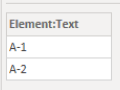
you want to extract the value A-1?
To do this, add a Custom Column in your query with this code
try Record.Field([participant.account]{0}, "Element:Text") otherwise [participant.account]
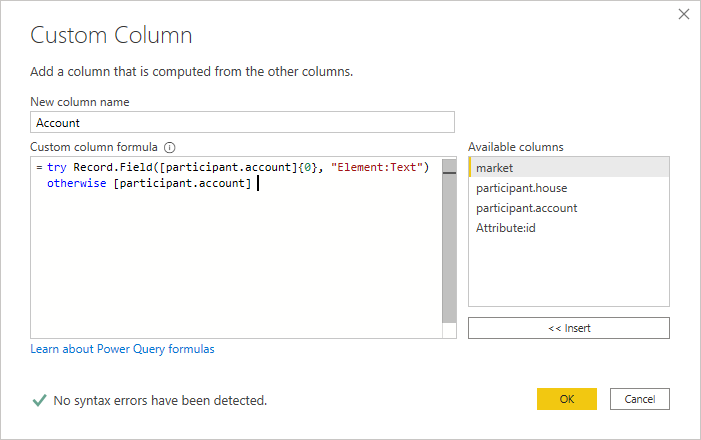
Which gives you this result

Note that this query uses the column/field names you used in your example. If they are different in your real data, they will need to be changed.
Regards
Phil
Proud to be a Super User!
You are trying to get the first value from a table embedded in a column?
So if your embedded table looks like this
you want to extract the value A-1?
To do this, add a Custom Column in your query with this code
try Record.Field([participant.account]{0}, "Element:Text") otherwise [participant.account]
Which gives you this result
Note that this query uses the column/field names you used in your example. If they are different in your real data, they will need to be changed.
Regards
Phil
Proud to be a Super User!
That's it !
Thank you very much !
Don't miss out on Data Days, June 15 through August 7. Learn Fabric, Power BI, SQL, AI and more.
Check out the May 2026 Power BI update to learn about new features.
| User | Count |
|---|---|
| 23 | |
| 21 | |
| 20 | |
| 19 | |
| 13 |
| User | Count |
|---|---|
| 58 | |
| 52 | |
| 38 | |
| 31 | |
| 27 |