Join us in Barcelona for FabCon and SQLCon, September 28 - October 1, 2026.
This is best Fabric, Power BI, SQL and AI community event. How do we know? The last event sold out! Save €200 with code FABCMTY200.
Register now- Power BI forums
- Get Help with Power BI
- Desktop
- Service
- Report Server
- Power Query
- Mobile Apps
- Developer
- DAX Commands and Tips
- Custom Visuals Development Discussion
- Health and Life Sciences
- Power BI Spanish forums
- Translated Spanish Desktop
- Training and Consulting
- Instructor Led Training
- Dashboard in a Day for Women, by Women
- Galleries
- Data Stories Gallery
- Themes Gallery
- Contests Gallery
- QuickViz Gallery
- Quick Measures Gallery
- Visual Calculations Gallery
- Fabric Apps Gallery
- Notebook Gallery
- Translytical Task Flow Gallery
- TMDL Gallery
- R Script Showcase
- Webinars and Video Gallery
- Ideas
- Custom Visuals Ideas (read-only)
- Issues
- Issues
- Events
- Upcoming Events
The Fabric community is now in read-only for platform upgrade. Learn more
- Power BI forums
- Forums
- Get Help with Power BI
- Desktop
- Moving Average function for Custom Calendar
- Subscribe to RSS Feed
- Mark Topic as New
- Mark Topic as Read
- Float this Topic for Current User
- Bookmark
- Subscribe
- Printer Friendly Page

- Mark as New
- Bookmark
- Subscribe
- Mute
- Subscribe to RSS Feed
- Permalink
Moving Average function for Custom Calendar
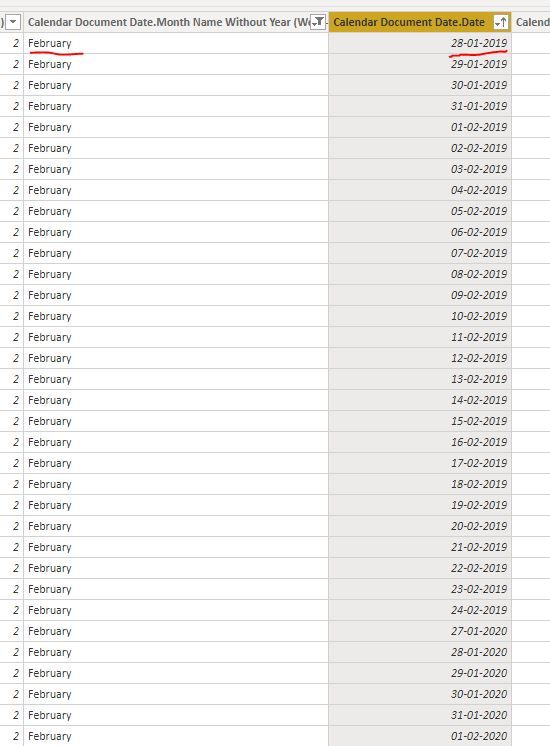
Hi all,
I have a custom calendar running on my report. For. e.g., in the picture, month start for feb is actually the 28th of Jan. The issue here is that when i try to calculate the moving average for the last 6 months using the following function (see below), i do not get the full month result that also includes the 28th of jan. I feel that it is because of the MONTH function that only calculates from the 1st of feb. Does anyone have any suggestions on how to solve this? Would be eternally grateful!
"
Solved! Go to Solution.


- Mark as New
- Bookmark
- Subscribe
- Mute
- Subscribe to RSS Feed
- Permalink
Sorry, my bad
* Matt is an 8 times Microsoft MVP (Power BI) and author of the Power BI Book Supercharge Power BI.
I will not give you bad advice, even if you unknowingly ask for it.
- Mark as New
- Bookmark
- Subscribe
- Mute
- Subscribe to RSS Feed
- Permalink
It's the n-1 issue that occurs with inclusive dates. If it's now March and you want 2 months of data you need month 3 -1 to get Feb, not month 3-2
* Matt is an 8 times Microsoft MVP (Power BI) and author of the Power BI Book Supercharge Power BI.
I will not give you bad advice, even if you unknowingly ask for it.
- Mark as New
- Bookmark
- Subscribe
- Mute
- Subscribe to RSS Feed
- Permalink
You cannot use the inbuilt time intelligence functions (such as DATESINPERIOD) for a non standard calendar. I recommend you add a monthID column to your calendar. Start at 1 for the first month and then increment by 1 for every new month, never restarting. This gives you a hook to write custom time intelligence functions. A rolling 6 month total would be something like this
Total project hours last 6 months = Calculate(sum('Project hours - Project Category & Area'[Project Hours]),filter(all('Calendar document date'),Calendar Document Date[MonthID]>= MAX('Calendar document date'[MonthID])-5 && Calendar Document Date[MonthID]<= MAX('Calendar document date'[MonthID])))
read my article here for more of an explanation https://exceleratorbi.com.au/dax-time-intelligence-beginners/
* Matt is an 8 times Microsoft MVP (Power BI) and author of the Power BI Book Supercharge Power BI.
I will not give you bad advice, even if you unknowingly ask for it.
- Mark as New
- Bookmark
- Subscribe
- Mute
- Subscribe to RSS Feed
- Permalink
- Mark as New
- Bookmark
- Subscribe
- Mute
- Subscribe to RSS Feed
- Permalink
Sorry, my bad
* Matt is an 8 times Microsoft MVP (Power BI) and author of the Power BI Book Supercharge Power BI.
I will not give you bad advice, even if you unknowingly ask for it.
- Mark as New
- Bookmark
- Subscribe
- Mute
- Subscribe to RSS Feed
- Permalink
You are amazing, good will come to you, good sir. But why is it -5 and not -6. sorry for the beginner question. :):)


- Mark as New
- Bookmark
- Subscribe
- Mute
- Subscribe to RSS Feed
- Permalink
@Anonymous , Try formula like
Rolling 6 = divide( CALCULATE(sum('Project hours - Project Category & Area'[Project Hours]),DATESINPERIOD('Date'[Date ],eomonth(MAX('Date'[Date]),0),-5,Day)) ,
CALCULATE(distinctCOUNT('Date'[Month Year]),DATESINPERIOD('Date'[Date],eomonth(MAX('Date'[Date]),0),-6,Day), filter(Sales,not(isblank(sum('Project hours - Project Category & Area'[Project Hours]))))))
I added divide by number of month, you can remove that if needed
Helpful resources

FabCon & SQLCon – Barcelona 2026
Join us in Barcelona for FabCon and SQLCon, the Fabric, Power BI, SQL, and AI community event. Save €200 with code FABCMTY200.

Power BI DataViz World Championships - June 2026
A new Power BI DataViz World Championship is coming this June! Don't miss out on submitting your entry.

| User | Count |
|---|---|
| 23 | |
| 22 | |
| 14 | |
| 14 | |
| 13 |


| User | Count |
|---|---|
| 47 | |
| 39 | |
| 24 | |
| 20 | |
| 20 |


