Join us at FabCon Atlanta from March 16 - 20, 2026, for the ultimate Fabric, Power BI, AI and SQL community-led event. Save $200 with code FABCOMM.
Register now!Vote for your favorite vizzies from the Power BI Dataviz World Championship submissions. Vote now!
Hello I have a couple of fields
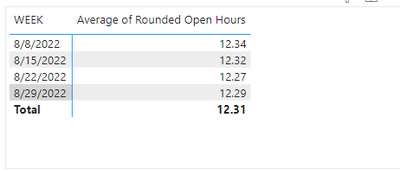
Week and Avgerage of Rounded Open Hours, I want to calcualte the difference between weeks
difference between 8/29/2022- 8/22/2022.
How do I do that?
Thanks!
Solved! Go to Solution.
You could create a measure like
Week on week diff =
VAR thisWeek =
SELECTEDVALUE ( 'Table'[Week] )
VAR thisWeekValue =
SELECTEDVALUE ( 'Table'[Average of Rounded Open Hours] )
VAR lastWeekValue =
LOOKUPVALUE (
'Table'[Average of Rounded Open Hours],
'Table'[Week], thisWeek - 7
)
RETURN
thisWeekValue - lastWeekValue
Hi,
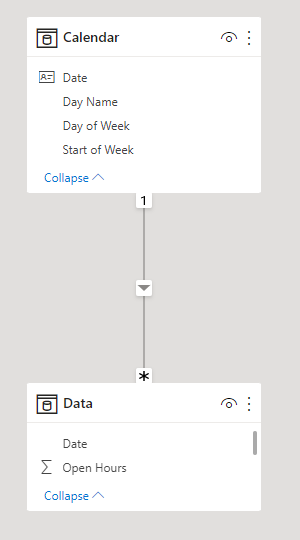
I am not sure how your data model looks like, but I tried to create a sample pbix file like below.
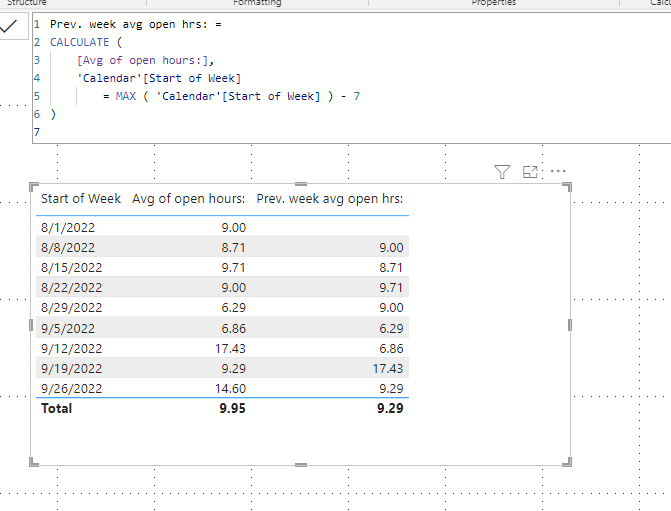
The below sample shows how to find the previous week's data.
I hope the below can provide some ideas on how to create a solution for your dataset.
Prev. week avg open hrs: =
CALCULATE (
[Avg of open hours:],
'Calendar'[Start of Week]
= MAX ( 'Calendar'[Start of Week] ) - 7
)
@Anonymous You want different between weeks as a Day OR difference beween weeks as Opened Hours? PLease also share the expected result which you want.
You could create a measure like
Week on week diff =
VAR thisWeek =
SELECTEDVALUE ( 'Table'[Week] )
VAR thisWeekValue =
SELECTEDVALUE ( 'Table'[Average of Rounded Open Hours] )
VAR lastWeekValue =
LOOKUPVALUE (
'Table'[Average of Rounded Open Hours],
'Table'[Week], thisWeek - 7
)
RETURN
thisWeekValue - lastWeekValue
If you love stickers, then you will definitely want to check out our Community Sticker Challenge!
Check out the January 2026 Power BI update to learn about new features.
| User | Count |
|---|---|
| 60 | |
| 59 | |
| 45 | |
| 17 | |
| 17 |
| User | Count |
|---|---|
| 115 | |
| 112 | |
| 38 | |
| 35 | |
| 26 |