Join us at FabCon Atlanta from March 16 - 20, 2026, for the ultimate Fabric, Power BI, AI and SQL community-led event. Save $200 with code FABCOMM.
Register now!Learn from the best! Meet the four finalists headed to the FINALS of the Power BI Dataviz World Championships! Register now
Hi ,
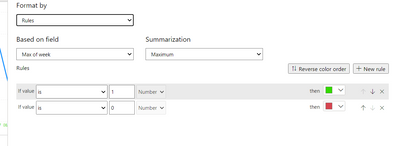
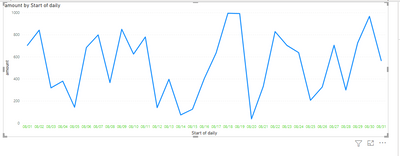
I am trying to color code the x-axis based on monday start of the week. Hence created a new column as week and put boolean value as 1 if week is monday else 0.
But when I am trying to put the logic its color coding one single color.
Accpeted output required is all the monday date of the week should be green and the remaining dates be red.
Regards,
Mohit
Solved! Go to Solution.
@Anonymous , Axis conditional formatting as of now is on grand total. Only label one is corrected recently to be on row value. Log and idea https://ideas.powerbi.com/ideas/
You can do conditional formatting on a bar or bar visual and convert it to line to get colored markers
@Anonymous , Axis conditional formatting as of now is on grand total. Only label one is corrected recently to be on row value. Log and idea https://ideas.powerbi.com/ideas/
You can do conditional formatting on a bar or bar visual and convert it to line to get colored markers
Share feedback directly with Fabric product managers, participate in targeted research studies and influence the Fabric roadmap.
Check out the February 2026 Power BI update to learn about new features.
| User | Count |
|---|---|
| 53 | |
| 48 | |
| 35 | |
| 14 | |
| 14 |
| User | Count |
|---|---|
| 93 | |
| 79 | |
| 37 | |
| 27 | |
| 25 |