Join us at FabCon Atlanta from March 16 - 20, 2026, for the ultimate Fabric, Power BI, AI and SQL community-led event. Save $200 with code FABCOMM.
Register now!Vote for your favorite vizzies from the Power BI Dataviz World Championship submissions. Vote now!
Hello I have a couple of fields
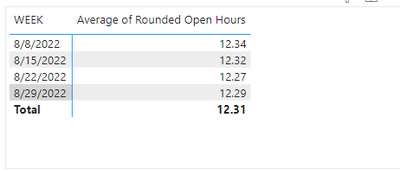
Week and Avgerage of Rounded Open Hours, I want to calcualte the difference between weeks
difference between 8/29/2022- 8/22/2022.
How do I do that?
Thanks!
Solved! Go to Solution.
You could create a measure like
Week on week diff =
VAR thisWeek =
SELECTEDVALUE ( 'Table'[Week] )
VAR thisWeekValue =
SELECTEDVALUE ( 'Table'[Average of Rounded Open Hours] )
VAR lastWeekValue =
LOOKUPVALUE (
'Table'[Average of Rounded Open Hours],
'Table'[Week], thisWeek - 7
)
RETURN
thisWeekValue - lastWeekValue
Hi,
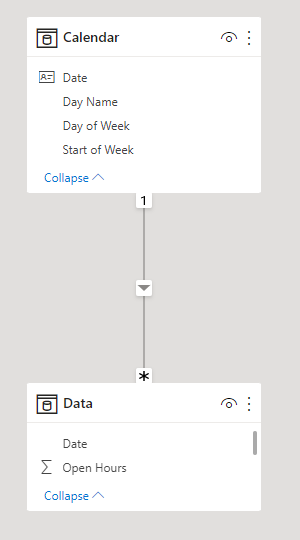
I am not sure how your data model looks like, but I tried to create a sample pbix file like below.
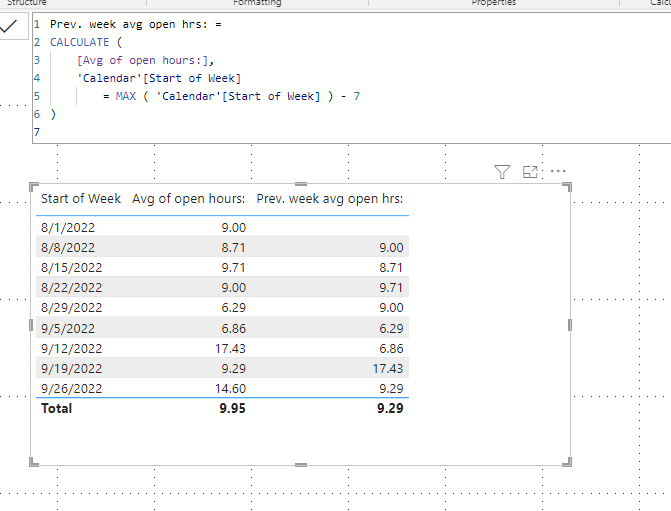
The below sample shows how to find the previous week's data.
I hope the below can provide some ideas on how to create a solution for your dataset.
Prev. week avg open hrs: =
CALCULATE (
[Avg of open hours:],
'Calendar'[Start of Week]
= MAX ( 'Calendar'[Start of Week] ) - 7
)
@Anonymous You want different between weeks as a Day OR difference beween weeks as Opened Hours? PLease also share the expected result which you want.
You could create a measure like
Week on week diff =
VAR thisWeek =
SELECTEDVALUE ( 'Table'[Week] )
VAR thisWeekValue =
SELECTEDVALUE ( 'Table'[Average of Rounded Open Hours] )
VAR lastWeekValue =
LOOKUPVALUE (
'Table'[Average of Rounded Open Hours],
'Table'[Week], thisWeek - 7
)
RETURN
thisWeekValue - lastWeekValue
Vote for your favorite vizzies from the Power BI World Championship submissions!
If you love stickers, then you will definitely want to check out our Community Sticker Challenge!
Check out the January 2026 Power BI update to learn about new features.
| User | Count |
|---|---|
| 56 | |
| 52 | |
| 45 | |
| 17 | |
| 16 |
| User | Count |
|---|---|
| 108 | |
| 108 | |
| 39 | |
| 33 | |
| 25 |