Hi @moizsherwani,
I think a calculated column would be a good solution. But you still can try it as a measure.
1. Calculated column.
1) One step.
TimeDiffOnestep =
VAR currentProject = 'Table1'[Project]
VAR currentTime = 'Table1'[TIME]
VAR nextEventTime =
    CALCULATE (
        MIN ( 'Table1'[TIME] ),
        FILTER (
            'Table1',
            'Table1'[Project] = currentProject
                && 'Table1'[TIME] > currentTime
        )
    )
RETURN
    IF (
        ISBLANK ( nextEventTime ),
        TODAY () - currentTime,
        nextEventTime - currentTime
    )
2) Two steps.
NextEventTime =
VAR currentProject = 'Table1'[Project]
VAR currentTime = 'Table1'[TIME]
VAR nextEventTime =
    CALCULATE (
        MIN ( 'Table1'[TIME] ),
        FILTER (
            'Table1',
            'Table1'[Project] = currentProject
                && 'Table1'[TIME] > currentTime
        )
    )
RETURN
    IF ( ISBLANK ( nextEventTime ), TODAY (), nextEventTime )
TimeDiffTwoSteps =
[NextEventTime] - [TIME]

2. As a measure.
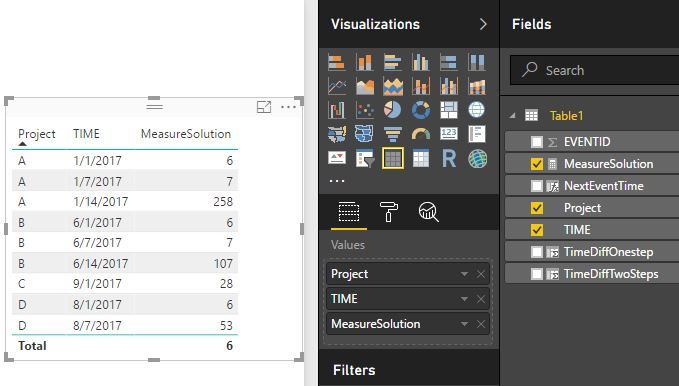
MeasureSolution =
VAR currentProject =
    MIN ( 'Table1'[Project] )
VAR currentTime =
    MIN ( 'Table1'[TIME] )
VAR nextEventTime =
    CALCULATE (
        MIN ( 'Table1'[TIME] ),
        FILTER (
            ALL ( 'Table1' ),
            'Table1'[Project] = currentProject
                && 'Table1'[TIME] > currentTime
        )
    )
RETURN
    IF (
        ISBLANK ( nextEventTime ),
        DATEDIFF ( currentTime, TODAY (), DAY ),
        DATEDIFF ( currentTime, nextEventTime, DAY )
    )
Best Regards!
Dale
Community Support Team _ Dale
If this post helps, then please consider Accept it as the solution to help the other members find it more quickly.


