cancel
Showing results for 
Search instead for 
Did you mean: 

Did you hear? There's a new SQL AI Developer certification (DP-800). Start preparing now and be one of the first to get certified. Register now

Reply
moizsherwani
Continued Contributor

Difference In Time of Events In Direct Query Mode

Hello everyone,


So thanks to @Eric_Zhang I was able to rank my projects according to time (link below)


http://community.powerbi.com/oxcrx34285/board/message?board.id=power-bi-designer&message.id=115834#M...


What I need now is a measure that will calculate the difference in the time of one event and the next in days for the same project. Example below (for the last event the difference will be the difference between now and that event). I have added a phony column called NextEventTime to explain my point.


Project - EVENTID  - TIME            - NEXTEVENTTIME    - TIME DIFF  - RANK  

A          - 1234        - 1/1/2017     -  1/7/2017                -     6            - 1

A          - 2345        - 1/7/2017     -  1/14/2017              -     7            - 2 

A          - 3456        - 1/14/2017   -  9/28/2017              -     257         - 3

B          - 7890         - 6/1/2017    -  6/7/2017                 -     6            - 1

B          - 8901         - 6/7/2017    -  6/14/2017               -     7            - 2

B          - 9012          - 6/14/2017  - 9/28/2017               -    106         - 3

C          - 6543          - 9/1/2017    - 9/28/2017               -    27           - 1

D          - 9876          - 8/1/2017   -1

D          - 7865          - 8/7/2017   -2

Thanks,

Moiz
Was I able to answer your question? Mark my post as a solution to help others. Kudos if you liked the solution.
1 ACCEPTED SOLUTION
v-jiascu-msft
Microsoft Employee
Microsoft Employee

Hi @moizsherwani,


Could you please mark the proper answer as solution or share the solution if it's convenient for you? That will be a big help to the others.


Best Regards!
Dale

Community Support Team _ Dale
If this post helps, then please consider Accept it as the solution to help the other members find it more quickly.

View solution in original post

4 REPLIES 4
v-jiascu-msft
Microsoft Employee
Microsoft Employee

Hi @moizsherwani,


Could you please mark the proper answer as solution or share the solution if it's convenient for you? That will be a big help to the others.


Best Regards!
Dale

Community Support Team _ Dale
If this post helps, then please consider Accept it as the solution to help the other members find it more quickly.

@v-jiascu-msft Thanks so much for your response. This doesn't work in Direct Query Mode though. Did you have that in mind when providing the proposed solution?


Thanks,

Moiz
Was I able to answer your question? Mark my post as a solution to help others. Kudos if you liked the solution.

@v-jiascu-msft Thanks so much for your response. This doesn't work in Direct Query Mode though. Did you have that in mind when providing the proposed solution?

Thanks,

Moiz
Was I able to answer your question? Mark my post as a solution to help others. Kudos if you liked the solution.
v-jiascu-msft
Microsoft Employee
Microsoft Employee

Hi @moizsherwani,


I think a calculated column would be a good solution. But you still can try it as a measure.

1. Calculated column.

1) One step.

TimeDiffOnestep =
VAR currentProject = 'Table1'[Project]
VAR currentTime = 'Table1'[TIME]
VAR nextEventTime =
    CALCULATE (
        MIN ( 'Table1'[TIME] ),
        FILTER (
            'Table1',
            'Table1'[Project] = currentProject
                && 'Table1'[TIME] > currentTime
        )
    )
RETURN
    IF (
        ISBLANK ( nextEventTime ),
        TODAY () - currentTime,
        nextEventTime - currentTime
    )

2) Two steps.

NextEventTime =
VAR currentProject = 'Table1'[Project]
VAR currentTime = 'Table1'[TIME]
VAR nextEventTime =
    CALCULATE (
        MIN ( 'Table1'[TIME] ),
        FILTER (
            'Table1',
            'Table1'[Project] = currentProject
                && 'Table1'[TIME] > currentTime
        )
    )
RETURN
    IF ( ISBLANK ( nextEventTime ), TODAY (), nextEventTime )
TimeDiffTwoSteps =
[NextEventTime] - [TIME]

Difference In Time of Events In Direct Query Mode1.JPG


2. As a measure.

MeasureSolution =
VAR currentProject =
    MIN ( 'Table1'[Project] )
VAR currentTime =
    MIN ( 'Table1'[TIME] )
VAR nextEventTime =
    CALCULATE (
        MIN ( 'Table1'[TIME] ),
        FILTER (
            ALL ( 'Table1' ),
            'Table1'[Project] = currentProject
                && 'Table1'[TIME] > currentTime
        )
    )
RETURN
    IF (
        ISBLANK ( nextEventTime ),
        DATEDIFF ( currentTime, TODAY (), DAY ),
        DATEDIFF ( currentTime, nextEventTime, DAY )
    )
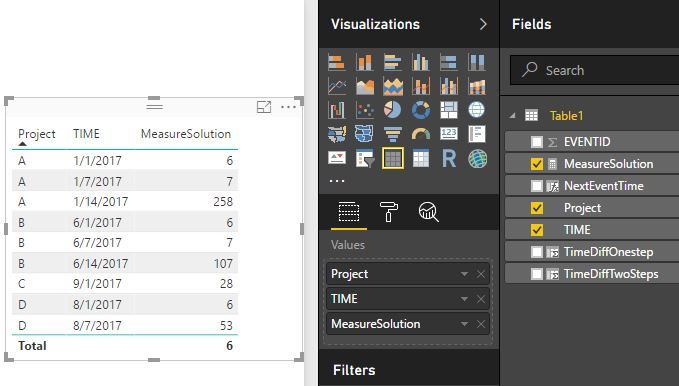
Difference In Time of Events In Direct Query Mode2.JPG


Best Regards!

Dale

Community Support Team _ Dale
If this post helps, then please consider Accept it as the solution to help the other members find it more quickly.

Helpful resources

Announcements
April Power BI Update Carousel

Power BI Monthly Update - April 2026

Check out the April 2026 Power BI update to learn about new features.

Fabric SQL PBI Data Days

Data Days 2026 coming soon!

Sign up to receive a private message when registration opens and key events begin.

New to Fabric survey Carousel

New to Fabric Survey

If you have recently started exploring Fabric, we'd love to hear how it's going. Your feedback can help with product improvements.

Power BI DataViz World Championships carousel

Power BI DataViz World Championships - June 2026

A new Power BI DataViz World Championship is coming this June! Don't miss out on submitting your entry.