cancel
Showing results for 
Search instead for 
Did you mean: 

The Power BI Data Visualization World Championships is back! Get ahead of the game and start preparing now! Learn more

Reply
Tucker1991
Frequent Visitor

Difference Between Consecutive Rows - When Date is The Same

Hi,


So theoretically I know exactly what I want to do. I am simply having a difficult time executing that in Power Bi.


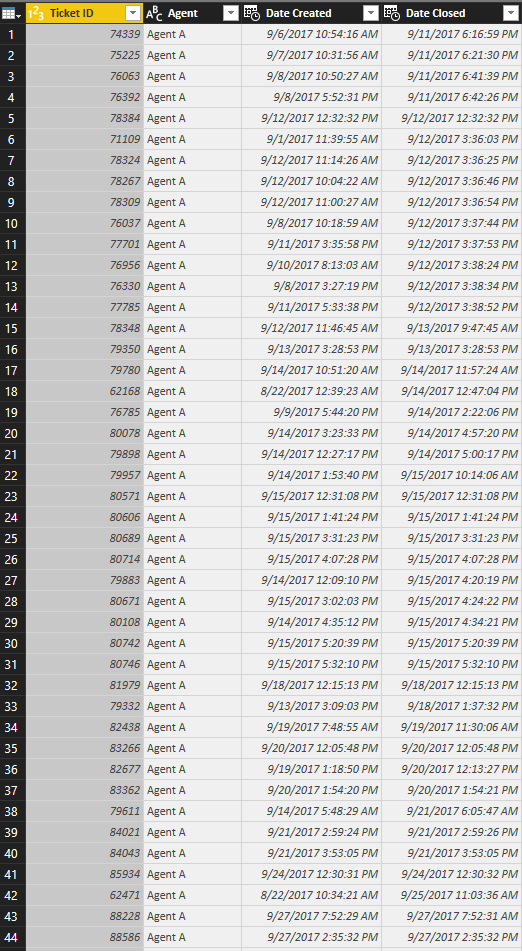
Basically I have a ton of data on helpdesk tickets. 


What I want is the difference in closure times for conescutive tickets per agent per day. 


I.E. How long did Agent A spend between closing ticket 1 versus ticket 2 versus ticket 3 versus ticket 4 on Septemeber 12th ect... ect...


Sample Ticket Data.PNG


The actual data has about 20 agents and over 75,000 tickets.

1 ACCEPTED SOLUTION
v-yulgu-msft
Microsoft Employee
Microsoft Employee

Hi @Tucker1991,


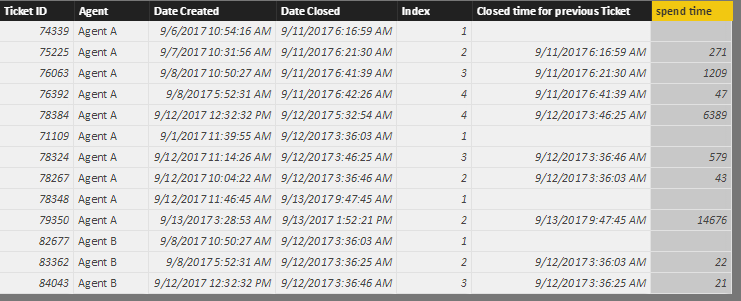
Please create some calculated columns with below formulas:

Index =
CALCULATE (
    COUNTROWS ( 'Agent ticket' ),
    FILTER (
        ALL ( 'Agent ticket' ),
        'Agent ticket'[Agent] = EARLIER ( 'Agent ticket'[Agent] )
            && 'Agent ticket'[Date Closed].[Date]
                = EARLIER ( 'Agent ticket'[Date Closed].[Date] )
            && 'Agent ticket'[Ticket ID] < EARLIER ( 'Agent ticket'[Ticket ID] )
    )
)
    + 1

Closed time for previous Ticket =
CALCULATE (
    MAX ( 'Agent ticket'[Date Closed] ),
    FILTER (
        ALLEXCEPT (
            'Agent ticket',
            'Agent ticket'[Agent],
            'Agent ticket'[Date Closed].[Date]
        ),
        'Agent ticket'[Index]
            = EARLIER ( 'Agent ticket'[Index] ) - 1
    )
)

spend time =
DATEDIFF (
    'Agent ticket'[Closed time for previous Ticket],
    'Agent ticket'[Date Closed],
    SECOND
)

1.PNG


Best regards,

Yuliana Gu

Community Support Team _ Yuliana Gu
If this post helps, then please consider Accept it as the solution to help the other members find it more quickly.

View solution in original post

2 REPLIES 2
v-yulgu-msft
Microsoft Employee
Microsoft Employee

Hi @Tucker1991,


Please create some calculated columns with below formulas:

Index =
CALCULATE (
    COUNTROWS ( 'Agent ticket' ),
    FILTER (
        ALL ( 'Agent ticket' ),
        'Agent ticket'[Agent] = EARLIER ( 'Agent ticket'[Agent] )
            && 'Agent ticket'[Date Closed].[Date]
                = EARLIER ( 'Agent ticket'[Date Closed].[Date] )
            && 'Agent ticket'[Ticket ID] < EARLIER ( 'Agent ticket'[Ticket ID] )
    )
)
    + 1

Closed time for previous Ticket =
CALCULATE (
    MAX ( 'Agent ticket'[Date Closed] ),
    FILTER (
        ALLEXCEPT (
            'Agent ticket',
            'Agent ticket'[Agent],
            'Agent ticket'[Date Closed].[Date]
        ),
        'Agent ticket'[Index]
            = EARLIER ( 'Agent ticket'[Index] ) - 1
    )
)

spend time =
DATEDIFF (
    'Agent ticket'[Closed time for previous Ticket],
    'Agent ticket'[Date Closed],
    SECOND
)

1.PNG


Best regards,

Yuliana Gu

Community Support Team _ Yuliana Gu
If this post helps, then please consider Accept it as the solution to help the other members find it more quickly.
Tucker1991
Frequent Visitor

Would I basically want to use a DAX formula similar to the one below.


Column = DATEDIFF (
'Ticket Data'[Time],
CALCULATE (
MIN ( [Time] ),
FILTER ( ALL ( 'Ticket Data' ), [INDEX] < EARLIER ( 'Ticket Data'[INDEX] ) )
),
SECOND
)


But  add IF Agent and Date is the same?


Thanks,


Helpful resources

Announcements
Power BI DataViz World Championships

Power BI Dataviz World Championships

The Power BI Data Visualization World Championships is back! Get ahead of the game and start preparing now!

December 2025 Power BI Update Carousel

Power BI Monthly Update - December 2025

Check out the December 2025 Power BI Holiday Recap!

FabCon Atlanta 2026 carousel

FabCon Atlanta 2026

Join us at FabCon Atlanta, March 16-20, for the ultimate Fabric, Power BI, AI and SQL community-led event. Save $200 with code FABCOMM.