cancel
Showing results for 
Search instead for 
Did you mean: 

The Fabric community is now in read-only for platform upgrade. Learn more

Reply
Tucker1991
Frequent Visitor

Difference Between Consecutive Rows - When Date is The Same

Hi,


So theoretically I know exactly what I want to do. I am simply having a difficult time executing that in Power Bi.


Basically I have a ton of data on helpdesk tickets. 


What I want is the difference in closure times for conescutive tickets per agent per day. 


I.E. How long did Agent A spend between closing ticket 1 versus ticket 2 versus ticket 3 versus ticket 4 on Septemeber 12th ect... ect...


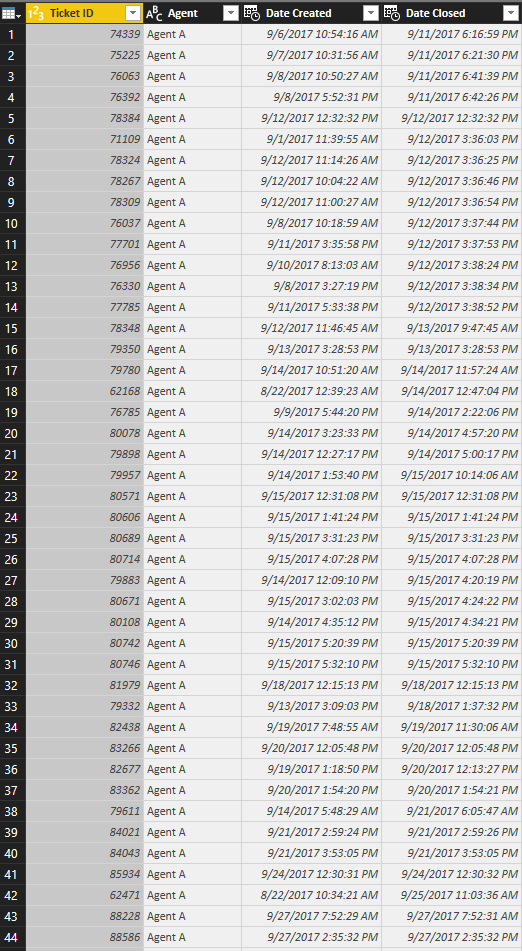
Sample Ticket Data.PNG


The actual data has about 20 agents and over 75,000 tickets.

1 ACCEPTED SOLUTION
v-yulgu-msft
Microsoft Employee
Microsoft Employee

Hi @Tucker1991,


Please create some calculated columns with below formulas:

Index =
CALCULATE (
    COUNTROWS ( 'Agent ticket' ),
    FILTER (
        ALL ( 'Agent ticket' ),
        'Agent ticket'[Agent] = EARLIER ( 'Agent ticket'[Agent] )
            && 'Agent ticket'[Date Closed].[Date]
                = EARLIER ( 'Agent ticket'[Date Closed].[Date] )
            && 'Agent ticket'[Ticket ID] < EARLIER ( 'Agent ticket'[Ticket ID] )
    )
)
    + 1

Closed time for previous Ticket =
CALCULATE (
    MAX ( 'Agent ticket'[Date Closed] ),
    FILTER (
        ALLEXCEPT (
            'Agent ticket',
            'Agent ticket'[Agent],
            'Agent ticket'[Date Closed].[Date]
        ),
        'Agent ticket'[Index]
            = EARLIER ( 'Agent ticket'[Index] ) - 1
    )
)

spend time =
DATEDIFF (
    'Agent ticket'[Closed time for previous Ticket],
    'Agent ticket'[Date Closed],
    SECOND
)
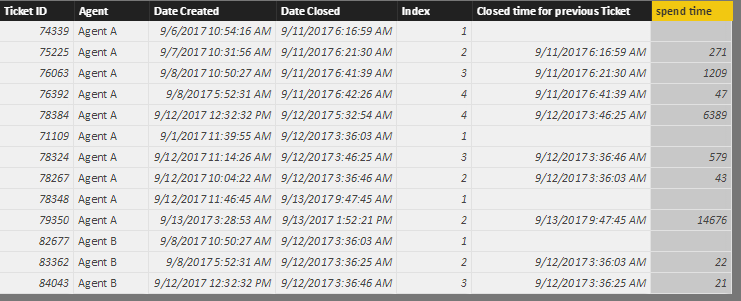
1.PNG


Best regards,

Yuliana Gu

Community Support Team _ Yuliana Gu
If this post helps, then please consider Accept it as the solution to help the other members find it more quickly.

View solution in original post

2 REPLIES 2
v-yulgu-msft
Microsoft Employee
Microsoft Employee

Hi @Tucker1991,


Please create some calculated columns with below formulas:

Index =
CALCULATE (
    COUNTROWS ( 'Agent ticket' ),
    FILTER (
        ALL ( 'Agent ticket' ),
        'Agent ticket'[Agent] = EARLIER ( 'Agent ticket'[Agent] )
            && 'Agent ticket'[Date Closed].[Date]
                = EARLIER ( 'Agent ticket'[Date Closed].[Date] )
            && 'Agent ticket'[Ticket ID] < EARLIER ( 'Agent ticket'[Ticket ID] )
    )
)
    + 1

Closed time for previous Ticket =
CALCULATE (
    MAX ( 'Agent ticket'[Date Closed] ),
    FILTER (
        ALLEXCEPT (
            'Agent ticket',
            'Agent ticket'[Agent],
            'Agent ticket'[Date Closed].[Date]
        ),
        'Agent ticket'[Index]
            = EARLIER ( 'Agent ticket'[Index] ) - 1
    )
)

spend time =
DATEDIFF (
    'Agent ticket'[Closed time for previous Ticket],
    'Agent ticket'[Date Closed],
    SECOND
)

1.PNG


Best regards,

Yuliana Gu

Community Support Team _ Yuliana Gu
If this post helps, then please consider Accept it as the solution to help the other members find it more quickly.
Tucker1991
Frequent Visitor

Would I basically want to use a DAX formula similar to the one below.


Column = DATEDIFF (
'Ticket Data'[Time],
CALCULATE (
MIN ( [Time] ),
FILTER ( ALL ( 'Ticket Data' ), [INDEX] < EARLIER ( 'Ticket Data'[INDEX] ) )
),
SECOND
)


But  add IF Agent and Date is the same?


Thanks,


Helpful resources

Announcements
FabCon and SQLCon Barcelona 2026

FabCon & SQLCon – Barcelona 2026

Join us in Barcelona for FabCon and SQLCon, the Fabric, Power BI, SQL, and AI community event. Save €200 with code FABCMTY200.

Power BI DataViz World Championships carousel

Power BI DataViz World Championships - June 2026

A new Power BI DataViz World Championship is coming this June! Don't miss out on submitting your entry.