This is best Fabric, Power BI, SQL and AI community event. How do we know? The last event sold out! Save €200 with code FABCMTY200.
Register nowA new Data Days event is coming soon! This time we’re going bigger than ever. Fabric, Power BI, SQL, AI and more. Don't miss out.
Hi,
So theoretically I know exactly what I want to do. I am simply having a difficult time executing that in Power Bi.
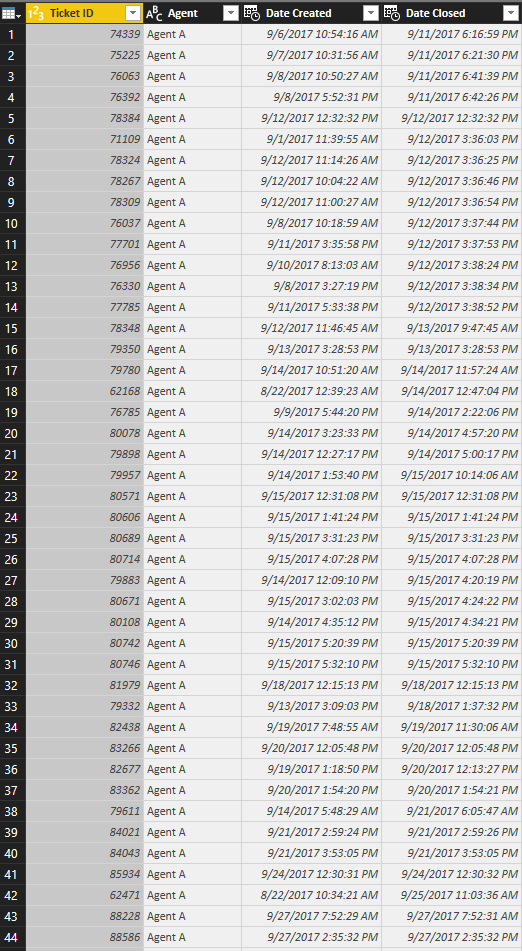
Basically I have a ton of data on helpdesk tickets.
What I want is the difference in closure times for conescutive tickets per agent per day.
I.E. How long did Agent A spend between closing ticket 1 versus ticket 2 versus ticket 3 versus ticket 4 on Septemeber 12th ect... ect...
The actual data has about 20 agents and over 75,000 tickets.
Solved! Go to Solution.
Hi @Tucker1991,
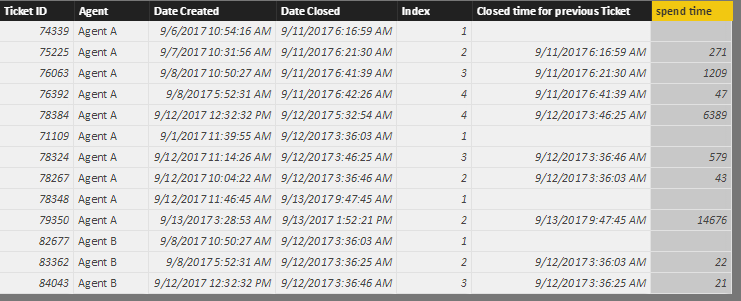
Please create some calculated columns with below formulas:
Index =
CALCULATE (
COUNTROWS ( 'Agent ticket' ),
FILTER (
ALL ( 'Agent ticket' ),
'Agent ticket'[Agent] = EARLIER ( 'Agent ticket'[Agent] )
&& 'Agent ticket'[Date Closed].[Date]
= EARLIER ( 'Agent ticket'[Date Closed].[Date] )
&& 'Agent ticket'[Ticket ID] < EARLIER ( 'Agent ticket'[Ticket ID] )
)
)
+ 1
Closed time for previous Ticket =
CALCULATE (
MAX ( 'Agent ticket'[Date Closed] ),
FILTER (
ALLEXCEPT (
'Agent ticket',
'Agent ticket'[Agent],
'Agent ticket'[Date Closed].[Date]
),
'Agent ticket'[Index]
= EARLIER ( 'Agent ticket'[Index] ) - 1
)
)
spend time =
DATEDIFF (
'Agent ticket'[Closed time for previous Ticket],
'Agent ticket'[Date Closed],
SECOND
)
Best regards,
Yuliana Gu
Hi @Tucker1991,
Please create some calculated columns with below formulas:
Index =
CALCULATE (
COUNTROWS ( 'Agent ticket' ),
FILTER (
ALL ( 'Agent ticket' ),
'Agent ticket'[Agent] = EARLIER ( 'Agent ticket'[Agent] )
&& 'Agent ticket'[Date Closed].[Date]
= EARLIER ( 'Agent ticket'[Date Closed].[Date] )
&& 'Agent ticket'[Ticket ID] < EARLIER ( 'Agent ticket'[Ticket ID] )
)
)
+ 1
Closed time for previous Ticket =
CALCULATE (
MAX ( 'Agent ticket'[Date Closed] ),
FILTER (
ALLEXCEPT (
'Agent ticket',
'Agent ticket'[Agent],
'Agent ticket'[Date Closed].[Date]
),
'Agent ticket'[Index]
= EARLIER ( 'Agent ticket'[Index] ) - 1
)
)
spend time =
DATEDIFF (
'Agent ticket'[Closed time for previous Ticket],
'Agent ticket'[Date Closed],
SECOND
)
Best regards,
Yuliana Gu
Would I basically want to use a DAX formula similar to the one below.
Column = DATEDIFF (
'Ticket Data'[Time],
CALCULATE (
MIN ( [Time] ),
FILTER ( ALL ( 'Ticket Data' ), [INDEX] < EARLIER ( 'Ticket Data'[INDEX] ) )
),
SECOND
)
But add IF Agent and Date is the same?
Thanks,
Check out the May 2026 Power BI update to learn about new features.
Sign up to receive a private message when registration opens and key events begin.
If you have recently started exploring Fabric, we'd love to hear how it's going. Your feedback can help with product improvements.
| User | Count |
|---|---|
| 31 | |
| 26 | |
| 23 | |
| 22 | |
| 13 |
| User | Count |
|---|---|
| 61 | |
| 47 | |
| 27 | |
| 23 | |
| 18 |