cancel
Showing results for 
Search instead for 
Did you mean: 

July 7 - July 17 | Round 2 of the Power BI Dataviz World Championships. Don't miss your chance! Learn more

Reply
aww91
Frequent Visitor

Diffence Report

Greetings,

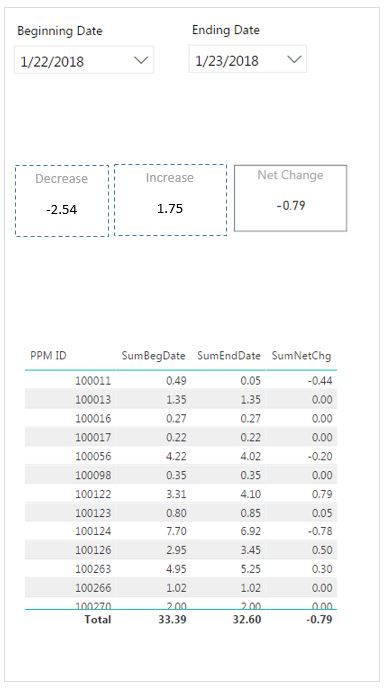
Any help with this problem will be greatly appreciated. Trying to create a difference report and I am running into problems with displaying two summaries (Net Increase and Decreases). The report is intended to allow the user to select beginning and end dates from the dropdowns and to display summary and detail information (see screen shot). The problem is that I cannot seem to get the right filter context needed to display Increase and Decrease – the net change is displaying fine. Again, thanks in advance for any suggestions.


Below: Screen shot of expected report, and link to Power BI application (Google Drive)

Expected Results.JPGDifference Report.pbix

1 ACCEPTED SOLUTION
Anonymous
Not applicable

@aww91,

Create the following measures in your Demand by Dates table.

checkpositive = IF([SumEndDate]>[SumBegDate],[SumEndDate]-[SumBegDate],0)

checknegative = IF([SumEndDate]<[SumBegDate],[SumEndDate]-[SumBegDate],0)

Increase = IF(COUNTROWS(VALUES('Demand By Dates'[PPM ID]))=1, [checkpositive],SUMX(VALUES('Demand By Dates'[PPM ID]),[checkpositive]))

Decrease = IF(COUNTROWS(VALUES('Demand By Dates'[PPM ID]))=1, [checknegative],SUMX(VALUES('Demand By Dates'[PPM ID]),[checknegative]))

Regards,
Lydia

View solution in original post

5 REPLIES 5
Greg_Deckler
Community Champion
Community Champion

If you are referring to your totals in your table, then see this article:


https://community.powerbi.com/t5/DAX-Commands-and-Tips/Dealing-with-Measure-Totals/td-p/63376


Follow on LinkedIn
@ me in replies or I'll lose your thread!!!
Instead of a Kudo, please vote for this idea
Become an expert!: Enterprise DNA
External Tools: MSHGQM
YouTube Channel!: Microsoft Hates Greg
Latest book!:
DAX For Humans

DAX is easy, CALCULATE makes DAX hard...

Good article, very well written however my situation is a little different. I am trying to sum separately positive and negative in the measure SumNetChg.

aww91
Frequent Visitor

Any other ideas or suggestions? I have been working on this problem for a week. Thanks in advance.

Anonymous
Not applicable

@aww91,

Create the following measures in your Demand by Dates table.

checkpositive = IF([SumEndDate]>[SumBegDate],[SumEndDate]-[SumBegDate],0)

checknegative = IF([SumEndDate]<[SumBegDate],[SumEndDate]-[SumBegDate],0)

Increase = IF(COUNTROWS(VALUES('Demand By Dates'[PPM ID]))=1, [checkpositive],SUMX(VALUES('Demand By Dates'[PPM ID]),[checkpositive]))

Decrease = IF(COUNTROWS(VALUES('Demand By Dates'[PPM ID]))=1, [checknegative],SUMX(VALUES('Demand By Dates'[PPM ID]),[checknegative]))

Regards,
Lydia

Outstanding! Works perfectly. Thank You.

Helpful resources

Announcements
FabCon and SQLCon Barcelona 2026

FabCon & SQLCon – Barcelona 2026

Join us in Barcelona for FabCon and SQLCon, the Fabric, Power BI, SQL, and AI community event. Save €200 with code FABCMTY200.

60 days of Data Days Carousel

Data Days 2026

Join Fabric Data Days 2026: 60 days of free live/on-demand sessions, challenges, study groups, and certification opportunities.

Power BI DataViz World Championships carousel

Power BI DataViz World Championships - June 2026

A new Power BI DataViz World Championship is coming this June! Don't miss out on submitting your entry.