Get certified for free when you join Fabric Data Days 2026 and dive into Fabric, Power BI, SQL, AI, and other essential data skills.
Join nowJuly 7 - July 17 | Round 2 of the Power BI Dataviz World Championships. Don't miss your chance! Learn more
Hello all,
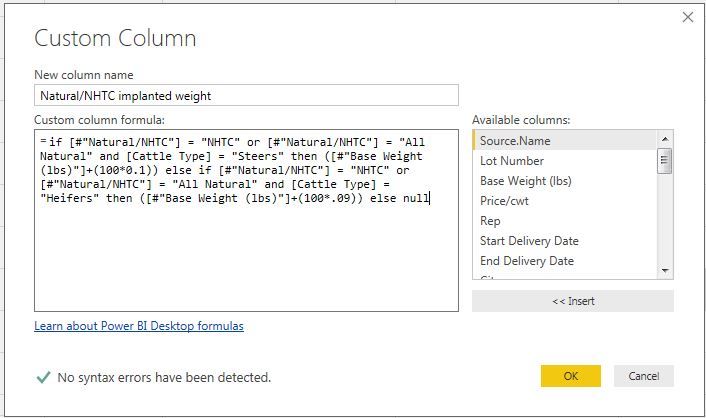
I'm trying to write a custom column formula in PowerBI desktop Query Editor to do a calculation. I have the following columns:
If the group of cattle is "NHTC/All Natural" and they are "Steers" (males), I want to take their "Base Weight" + (100*0.1).
If the group of cattle is "NHTC/All Natural" and they are "Heifers" (females), I want to take their "Base Weight" + (100*.09).
Otherwise I wish to leave the new column empty ("null").
When I run this formula the way it is below, it works correctly in that it only selects those groups which are "NHTC/All Natural" but it is taking the "Base Weight" from the "Heifers" and adding it to (100*0.1) instead of (100*0.09).
Any tips on how I can alter this to get "Base Weight" from "Heifers" added to (100*0.09)?
Solved! Go to Solution.
Probably you are just missing the paranthesis in your formula.
Just change it to follow the below pattern -
if ((x=XXX or y=YYY) AND z=zzzz) THEN BASEWt + (100*.1)
else if ((x=XXX or y=YYY) AND z=zzzz) THEN BASEWt + (100*.09)
else null
Hope, this helps!
That solved it! Thank you so much, I sincerely appreciate your help!
Probably you are just missing the paranthesis in your formula.
Just change it to follow the below pattern -
if ((x=XXX or y=YYY) AND z=zzzz) THEN BASEWt + (100*.1)
else if ((x=XXX or y=YYY) AND z=zzzz) THEN BASEWt + (100*.09)
else null
Hope, this helps!
Join us in Barcelona for FabCon and SQLCon, the Fabric, Power BI, SQL, and AI community event. Save €200 with code FABCMTY200.
Join Data Days 2026: 60 days of free live/on-demand sessions, challenges, study groups, and certification opportunities.
| User | Count |
|---|---|
| 29 | |
| 23 | |
| 18 | |
| 18 | |
| 15 |
| User | Count |
|---|---|
| 51 | |
| 44 | |
| 43 | |
| 39 | |
| 32 |