cancel
Showing results for 
Search instead for 
Did you mean: 

Learn from the best! Meet the four finalists headed to the FINALS of the Power BI Dataviz World Championships! Register now

Reply
nswilen
Regular Visitor

Desktop Query Editor: Custom Column

Hello all,


I'm trying to write a custom column formula in PowerBI desktop Query Editor to do a calculation. I have the following columns:

  1. "Base Weight" = describes the weight of the animal
  2. "Cattle Type" = describes the sex of the animal
  3. "NHTC/All Natural" = describes a status of the animal


If the group of cattle is "NHTC/All Natural" and they are "Steers" (males), I want to take their "Base Weight" + (100*0.1).


If the group of cattle is "NHTC/All Natural" and they are "Heifers" (females), I want to take their "Base Weight" + (100*.09).


Otherwise I wish to leave the new column empty ("null").


When I run this formula the way it is below, it works correctly in that it only selects those groups which are "NHTC/All Natural" but it is taking the "Base Weight" from the "Heifers" and adding it to (100*0.1) instead of (100*0.09).


Any tips on how I can alter this to get "Base Weight" from "Heifers" added to (100*0.09)?
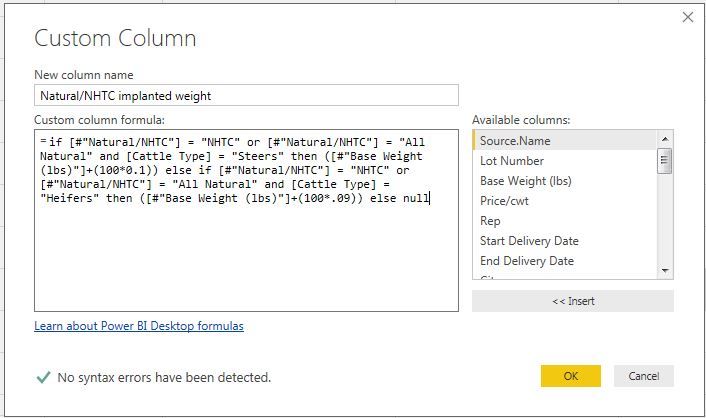
 

Capture.JPG


1 ACCEPTED SOLUTION
vinaypugalia
Resolver I
Resolver I

Probably you are just missing the paranthesis in your formula.

Just change it to follow the below pattern - 

if ((x=XXX or y=YYY) AND z=zzzz) THEN BASEWt + (100*.1)

else if ((x=XXX or y=YYY) AND z=zzzz) THEN BASEWt + (100*.09)

else null


Hope, this helps!

View solution in original post

2 REPLIES 2
nswilen
Regular Visitor

That solved it! Thank you so much, I sincerely appreciate your help!

vinaypugalia
Resolver I
Resolver I

Probably you are just missing the paranthesis in your formula.

Just change it to follow the below pattern - 

if ((x=XXX or y=YYY) AND z=zzzz) THEN BASEWt + (100*.1)

else if ((x=XXX or y=YYY) AND z=zzzz) THEN BASEWt + (100*.09)

else null


Hope, this helps!

Helpful resources

Announcements
Join our Fabric User Panel

Join our Fabric User Panel

Share feedback directly with Fabric product managers, participate in targeted research studies and influence the Fabric roadmap.

February Power BI Update Carousel

Power BI Monthly Update - February 2026

Check out the February 2026 Power BI update to learn about new features.