
Don't miss your chance to take the Fabric Data Engineer (DP-600) exam for FREE! Find out how by attending the DP-600 session on April 23rd (pacific time), live or on-demand.
Learn moreJoin the FabCon + SQLCon recap series. Up next: Power BI, Real-Time Intelligence, IQ and AI, and Data Factory take center stage. All sessions are available on-demand after the live show. Register now
Hi all,
This should be a pretty easy problem but I´m not able to solve it...
I created below table "RFE Trucks"
What I want to do is analyse the DelayCode1 and DelayCode2 columns
I´m trying to show this in a visual with some sort of rank of those codes (34 in above example). Column contains a number.
This is how I imagine the formula:
Check each row and tell me how many times did we use this code and then give me a rank with top used delaycode etc.
Delaycode is optional so there might be a lot of empty cells.
Hoping for your help!
Brgds
Solved! Go to Solution.
Hi @TimonMeyer
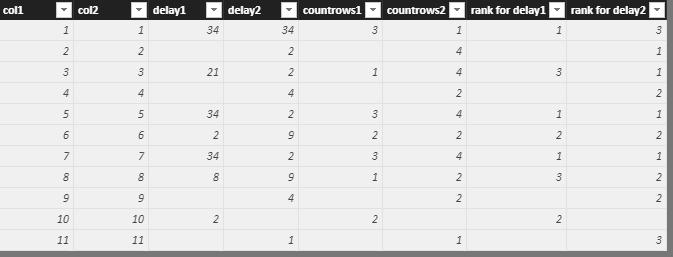
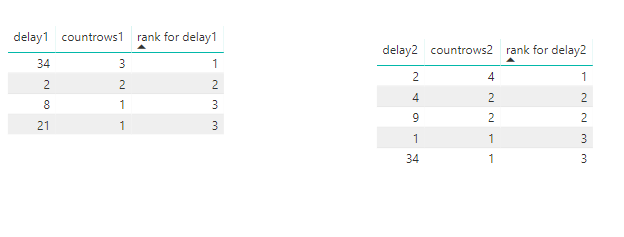
Based on your requirement, I make a test with my example data.
Create calculated columns
countrows1 = CALCULATE(COUNT(Sheet1[delay1]),ALLEXCEPT(Sheet1,Sheet1[delay1]))
countrows2 = CALCULATE(COUNT(Sheet1[delay2]),ALLEXCEPT(Sheet1,Sheet1[delay2]))
rank for delay1 = IF([countrows1]<>BLANK(),RANKX(ALL(Sheet1),[countrows1],,DESC,Dense))
rank for delay2 = IF([countrows2]<>BLANK(),RANKX(ALL(Sheet1),[countrows2],,DESC,Dense))
Best Regards
Maggie
Hi @TimonMeyer
Based on your requirement, I make a test with my example data.
Create calculated columns
countrows1 = CALCULATE(COUNT(Sheet1[delay1]),ALLEXCEPT(Sheet1,Sheet1[delay1]))
countrows2 = CALCULATE(COUNT(Sheet1[delay2]),ALLEXCEPT(Sheet1,Sheet1[delay2]))
rank for delay1 = IF([countrows1]<>BLANK(),RANKX(ALL(Sheet1),[countrows1],,DESC,Dense))
rank for delay2 = IF([countrows2]<>BLANK(),RANKX(ALL(Sheet1),[countrows2],,DESC,Dense))
Best Regards
Maggie
Hi Maggie
Thanks for your reply...very helpful.
Unfortunately I´m having problems with the rank delay.
Rankdelay 1 = IF([countdelay]<>BLANK();RANKX(ALL('RFE Trucks';[countdelay];;DESC;Dense))It keeps telling me that "Argument ´3´ in ALL function is required". RFE Trucks is my table.
Where is my mistake here?
Brgds
Hi @TimonMeyer
Use this for a try
Rankdelay 1 = IF([countdelay]<>BLANK();RANKX(ALL('RFE Trucks');[countdelay];;DESC;Dense))
Best Regards
Maggie
Hi Maggie,
tried that too myself without success...anyway your formula worked now 🙂
Thanks a lot for your help!
Brgds
Check out the April 2026 Power BI update to learn about new features.
If you have recently started exploring Fabric, we'd love to hear how it's going. Your feedback can help with product improvements.
A new Power BI DataViz World Championship is coming this June! Don't miss out on submitting your entry.
| User | Count |
|---|---|
| 48 | |
| 40 | |
| 37 | |
| 20 | |
| 16 |
| User | Count |
|---|---|
| 68 | |
| 67 | |
| 30 | |
| 26 | |
| 26 |