
This time we’re going bigger than ever. Fabric, Power BI, SQL, AI and more. We're covering it all. You won't want to miss it.
Learn moreDid you hear? There's a new SQL AI Developer certification (DP-800). Start preparing now and be one of the first to get certified. Register now
Hi all,
This should be a pretty easy problem but I´m not able to solve it...
I created below table "RFE Trucks"
What I want to do is analyse the DelayCode1 and DelayCode2 columns
I´m trying to show this in a visual with some sort of rank of those codes (34 in above example). Column contains a number.
This is how I imagine the formula:
Check each row and tell me how many times did we use this code and then give me a rank with top used delaycode etc.
Delaycode is optional so there might be a lot of empty cells.
Hoping for your help!
Brgds
Solved! Go to Solution.
Hi @TimonMeyer
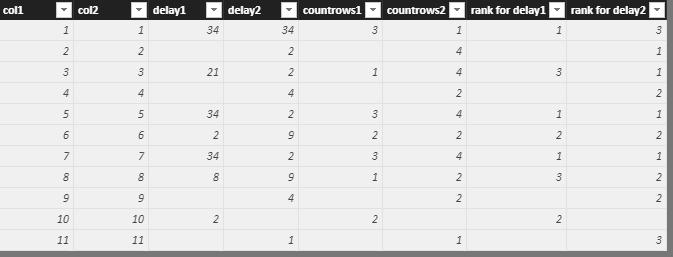
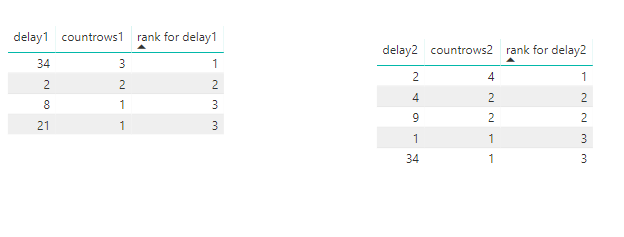
Based on your requirement, I make a test with my example data.
Create calculated columns
countrows1 = CALCULATE(COUNT(Sheet1[delay1]),ALLEXCEPT(Sheet1,Sheet1[delay1]))
countrows2 = CALCULATE(COUNT(Sheet1[delay2]),ALLEXCEPT(Sheet1,Sheet1[delay2]))
rank for delay1 = IF([countrows1]<>BLANK(),RANKX(ALL(Sheet1),[countrows1],,DESC,Dense))
rank for delay2 = IF([countrows2]<>BLANK(),RANKX(ALL(Sheet1),[countrows2],,DESC,Dense))
Best Regards
Maggie
Hi @TimonMeyer
Based on your requirement, I make a test with my example data.
Create calculated columns
countrows1 = CALCULATE(COUNT(Sheet1[delay1]),ALLEXCEPT(Sheet1,Sheet1[delay1]))
countrows2 = CALCULATE(COUNT(Sheet1[delay2]),ALLEXCEPT(Sheet1,Sheet1[delay2]))
rank for delay1 = IF([countrows1]<>BLANK(),RANKX(ALL(Sheet1),[countrows1],,DESC,Dense))
rank for delay2 = IF([countrows2]<>BLANK(),RANKX(ALL(Sheet1),[countrows2],,DESC,Dense))
Best Regards
Maggie
Hi Maggie
Thanks for your reply...very helpful.
Unfortunately I´m having problems with the rank delay.
Rankdelay 1 = IF([countdelay]<>BLANK();RANKX(ALL('RFE Trucks';[countdelay];;DESC;Dense))It keeps telling me that "Argument ´3´ in ALL function is required". RFE Trucks is my table.
Where is my mistake here?
Brgds
Hi @TimonMeyer
Use this for a try
Rankdelay 1 = IF([countdelay]<>BLANK();RANKX(ALL('RFE Trucks');[countdelay];;DESC;Dense))
Best Regards
Maggie
Hi Maggie,
tried that too myself without success...anyway your formula worked now 🙂
Thanks a lot for your help!
Brgds
Check out the April 2026 Power BI update to learn about new features.
Sign up to receive a private message when registration opens and key events begin.
If you have recently started exploring Fabric, we'd love to hear how it's going. Your feedback can help with product improvements.
| User | Count |
|---|---|
| 36 | |
| 33 | |
| 31 | |
| 21 | |
| 16 |
| User | Count |
|---|---|
| 66 | |
| 55 | |
| 31 | |
| 24 | |
| 23 |