cancel
Showing results for 
Search instead for 
Did you mean: 

Did you hear? There's a new SQL AI Developer certification (DP-800). Start preparing now and be one of the first to get certified. Register now

Reply
samnaw
Resolver I
Resolver I

Decomposition tree graph help

Hello:


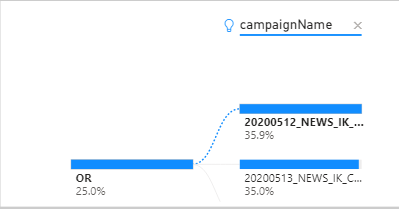
I am building a decomposition tree graph but the length of "campaignName" is too long. Is there way to word wrap of see the whole campaignname in this graph. Even if I hover the mouse over the campaign name it still shows part of the name. 


Capture.PNG


Thanks, 

Sam

1 ACCEPTED SOLUTION
v-alq-msft
Community Support
Community Support

Hi, @samnaw 


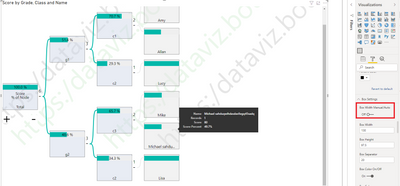
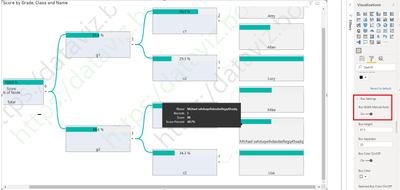
You may go to 'Visualizations'=>'Format'=>'Box Settings', check if 'Box Width Manual/Auto' is on. 

If it is set as off, it displays part of the name.

a1.png


If it is set as on, it displays entire name.

a2.png


For further information, you may refer the updated information about Decomposition tree in the blog .


Best Regards

Allan


If this post helps, then please consider Accept it as the solution to help the other members find it more quickly.

View solution in original post

3 REPLIES 3
v-alq-msft
Community Support
Community Support

Hi, @samnaw 


If you take the answer of someone, please mark it as the solution to help the other members who have same problems find it more quickly. If not, let me know and I'll try to help you further. Thanks.


Best Regards

Allan

v-alq-msft
Community Support
Community Support

Hi, @samnaw 


You may go to 'Visualizations'=>'Format'=>'Box Settings', check if 'Box Width Manual/Auto' is on. 

If it is set as off, it displays part of the name.

a1.png


If it is set as on, it displays entire name.

a2.png


For further information, you may refer the updated information about Decomposition tree in the blog .


Best Regards

Allan


If this post helps, then please consider Accept it as the solution to help the other members find it more quickly.

amitchandak
Super User
Super User

@samnaw , I checked, i did not found any warp text other then title

Share with Power BI Enthusiasts: Full Power BI Video (20 Hours) YouTube
Microsoft Fabric Series 60+ Videos YouTube
Microsoft Fabric Hindi End to End YouTube

Helpful resources

Announcements
April Power BI Update Carousel

Power BI Monthly Update - April 2026

Check out the April 2026 Power BI update to learn about new features.

New to Fabric survey Carousel

New to Fabric Survey

If you have recently started exploring Fabric, we'd love to hear how it's going. Your feedback can help with product improvements.

Power BI DataViz World Championships carousel

Power BI DataViz World Championships - June 2026

A new Power BI DataViz World Championship is coming this June! Don't miss out on submitting your entry.

FabCon and SQLCon Highlights Carousel

FabCon & SQLCon Highlights

Experience the highlights from FabCon & SQLCon, available live and on-demand starting April 14th.