Get certified for free when you join Fabric Data Days 2026 and dive into Fabric, Power BI, SQL, AI, and other essential data skills.
Join nowTry your skills in the Power BI Dataviz World Championship! Round one ends June 26. Join now
Hello:
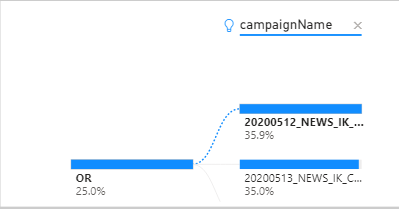
I am building a decomposition tree graph but the length of "campaignName" is too long. Is there way to word wrap of see the whole campaignname in this graph. Even if I hover the mouse over the campaign name it still shows part of the name.
Thanks,
Sam
Solved! Go to Solution.
Hi, @samnaw
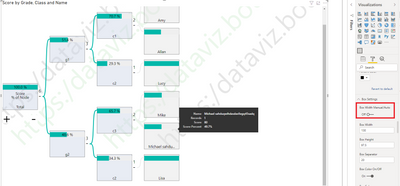
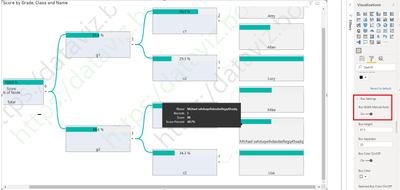
You may go to 'Visualizations'=>'Format'=>'Box Settings', check if 'Box Width Manual/Auto' is on.
If it is set as off, it displays part of the name.
If it is set as on, it displays entire name.
For further information, you may refer the updated information about Decomposition tree in the blog .
Best Regards
Allan
If this post helps, then please consider Accept it as the solution to help the other members find it more quickly.
Hi, @samnaw
If you take the answer of someone, please mark it as the solution to help the other members who have same problems find it more quickly. If not, let me know and I'll try to help you further. Thanks.
Best Regards
Allan
Hi, @samnaw
You may go to 'Visualizations'=>'Format'=>'Box Settings', check if 'Box Width Manual/Auto' is on.
If it is set as off, it displays part of the name.
If it is set as on, it displays entire name.
For further information, you may refer the updated information about Decomposition tree in the blog .
Best Regards
Allan
If this post helps, then please consider Accept it as the solution to help the other members find it more quickly.
Don't miss out on Data Days, June 15 through August 7. Learn Fabric, Power BI, SQL, AI and more.
Check out the May 2026 Power BI update to learn about new features.
| User | Count |
|---|---|
| 23 | |
| 21 | |
| 20 | |
| 19 | |
| 13 |
| User | Count |
|---|---|
| 58 | |
| 52 | |
| 38 | |
| 31 | |
| 27 |