Join us at FabCon Atlanta from March 16 - 20, 2026, for the ultimate Fabric, Power BI, AI and SQL community-led event. Save $200 with code FABCOMM.
Register now!Learn from the best! Meet the four finalists headed to the FINALS of the Power BI Dataviz World Championships! Register now
Hi All --
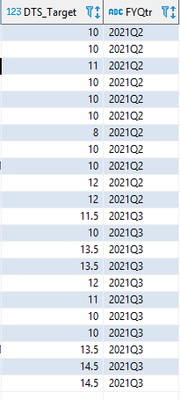
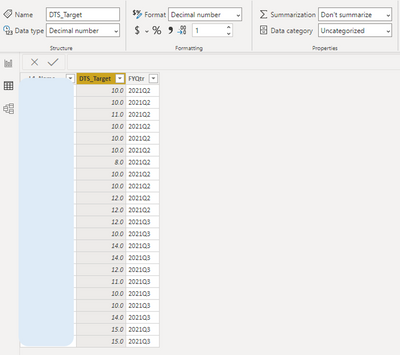
I have a decimal data type that is automatically rounding up to the nearest integer. For example in the last row, the data source has 14.5, but in Powerbi it is 15.0 . I would like to show the number from the datasource (14.5). Any ideas on how to fix this?
Data Type = Decimal
Format = Decimal
Formatted to 1 decimal place
DataSource:
PowerBI:
Solved! Go to Solution.
Hello @dogt1225 ,
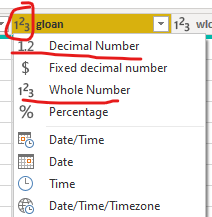
What is the data type assigned in Power Query editor? Please check if it is a decimal or whole number.
Cheers!
Vivek
Blog: vivran.in/my-blog
Connect on LinkedIn
Follow on Twitter
Hello @dogt1225 ,
What is the data type assigned in Power Query editor? Please check if it is a decimal or whole number.
Cheers!
Vivek
Blog: vivran.in/my-blog
Connect on LinkedIn
Follow on Twitter
Ah! This gets me every time.. I change the data type in the Report tab, but forget to change in Power Query Editor.
Thanks you for the help!
Share feedback directly with Fabric product managers, participate in targeted research studies and influence the Fabric roadmap.
Check out the February 2026 Power BI update to learn about new features.
| User | Count |
|---|---|
| 61 | |
| 54 | |
| 40 | |
| 16 | |
| 14 |
| User | Count |
|---|---|
| 98 | |
| 84 | |
| 35 | |
| 30 | |
| 25 |