Get certified for free when you join Fabric Data Days 2026 and dive into Fabric, Power BI, SQL, AI, and other essential data skills.
Join nowJuly 28 - August 9 | Final Round of the Power BI Dataviz World Championships. This is your chance. Learn more
Hi All --
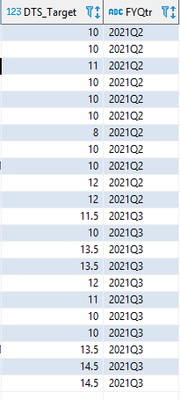
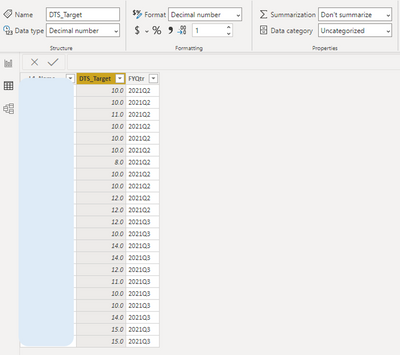
I have a decimal data type that is automatically rounding up to the nearest integer. For example in the last row, the data source has 14.5, but in Powerbi it is 15.0 . I would like to show the number from the datasource (14.5). Any ideas on how to fix this?
Data Type = Decimal
Format = Decimal
Formatted to 1 decimal place
DataSource:
PowerBI:
Solved! Go to Solution.
Hello @dogt1225 ,
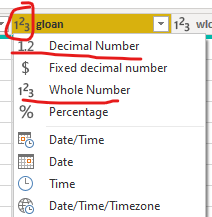
What is the data type assigned in Power Query editor? Please check if it is a decimal or whole number.
Cheers!
Vivek
Blog: vivran.in/my-blog
Connect on LinkedIn
Follow on Twitter
Hello @dogt1225 ,
What is the data type assigned in Power Query editor? Please check if it is a decimal or whole number.
Cheers!
Vivek
Blog: vivran.in/my-blog
Connect on LinkedIn
Follow on Twitter
Ah! This gets me every time.. I change the data type in the Report tab, but forget to change in Power Query Editor.
Thanks you for the help!
If you love stickers, then you will definitely want to check out our community sticker challenge, Barcelona edition!
Check out the July 2026 Power BI update to learn about new features.
| User | Count |
|---|---|
| 29 | |
| 28 | |
| 20 | |
| 20 | |
| 19 |
| User | Count |
|---|---|
| 35 | |
| 26 | |
| 20 | |
| 18 | |
| 17 |