cancel
Showing results for 
Search instead for 
Did you mean: 

We've captured the moments from FabCon & SQLCon that everyone is talking about, and we are bringing them to the community, live and on-demand. Starts on April 14th. Register now

Reply
Markzolotoy
Impactful Individual

Debug connection problems

I am trying using fiddler to debug connection problems, but I dont see anything relevant to PBI in Fiddler. Any idea how to make it work? I am accessing APIs on my local system.


Thanks

2 ACCEPTED SOLUTIONS
PhilipTreacy
Super User
Super User

Hi @Markzolotoy 

Try Proxifier

Proxifier - The Most Advanced Proxy Client

It will capture all traffic from all processes.

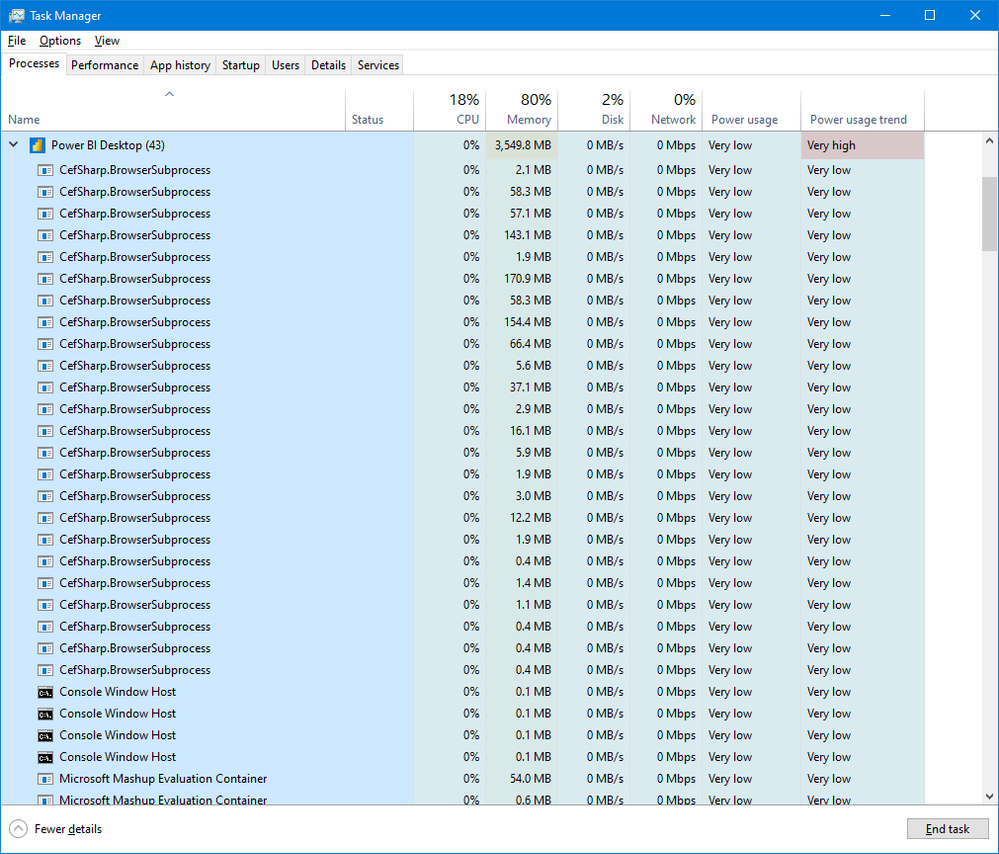
What you are looking for is the CefSharp.BrowserSubprocess part of PBI Desktop.

taskm.png

Regards

Phil


Did I answer your question? Then please mark my post as the solution.
If I helped you, click on the Thumbs Up to give Kudos.


Blog :: YouTube Channel :: Connect on Linkedin


Proud to be a Super User!


View solution in original post

Should Power BI Desktop be configured to use a proxy? Where would I enter "CefSharp.BrowserSubprocess part"? Seems like I have to add a proxy server to this Proxifier. I have to admit I have no idea. I watched videos, but they show some IPs, some ports. Where all of this is coming from? Do I have to add a proxy server to my box?

View solution in original post

5 REPLIES 5
PhilipTreacy
Super User
Super User

Hi @Markzolotoy 

Try Proxifier

Proxifier - The Most Advanced Proxy Client

It will capture all traffic from all processes.

What you are looking for is the CefSharp.BrowserSubprocess part of PBI Desktop.

taskm.png

Regards

Phil


Did I answer your question? Then please mark my post as the solution.
If I helped you, click on the Thumbs Up to give Kudos.


Blog :: YouTube Channel :: Connect on Linkedin


Proud to be a Super User!


Should Power BI Desktop be configured to use a proxy? Where would I enter "CefSharp.BrowserSubprocess part"? Seems like I have to add a proxy server to this Proxifier. I have to admit I have no idea. I watched videos, but they show some IPs, some ports. Where all of this is coming from? Do I have to add a proxy server to my box?

Markzolotoy
Impactful Individual

Fiddler has its default configuration. What is happening is that it does not intercept traffic that goes from non-browsers processes. It seems like Power BI desktop is not proxy aware. I found this:

Using Data Explorer behind a proxy - solution (microsoft.com)

but not sure if it's the way to go.

PhilipTreacy
Super User
Super User

Hi @Markzolotoy 

Please clarify what you mean by local system?  Your own PC?  Your local network?

Have you got Fiddler configured to intercept traffic going to localhost (your own PC)?  Or is it just intercepting web traffic heading out to the internet?


Did I answer your question? Then please mark my post as the solution.
If I helped you, click on the Thumbs Up to give Kudos.


Blog :: YouTube Channel :: Connect on Linkedin


Proud to be a Super User!


Markzolotoy
Impactful Individual

Anybody, any idea? I am stuck with this. NO matter what I do, Fiddler ins not catching calls to local APIs.

Helpful resources

Announcements
New to Fabric survey Carousel

New to Fabric Survey

If you have recently started exploring Fabric, we'd love to hear how it's going. Your feedback can help with product improvements.

Power BI DataViz World Championships carousel

Power BI DataViz World Championships - June 2026

A new Power BI DataViz World Championship is coming this June! Don't miss out on submitting your entry.

Join our Fabric User Panel

Join our Fabric User Panel

Share feedback directly with Fabric product managers, participate in targeted research studies and influence the Fabric roadmap.

March Power BI Update Carousel

Power BI Community Update - March 2026

Check out the March 2026 Power BI update to learn about new features.