Get Fabric or SQL Certified for Free.
Get certified for free when you join Fabric Data Days 2026 and dive into Fabric, Power BI, SQL, AI, and other essential data skills.
Join now- Power BI forums
- Get Help with Power BI
- Desktop
- Service
- Report Server
- Power Query
- Mobile Apps
- Developer
- DAX Commands and Tips
- Custom Visuals Development Discussion
- Health and Life Sciences
- Power BI Spanish forums
- Translated Spanish Desktop
- Training and Consulting
- Instructor Led Training
- Dashboard in a Day for Women, by Women
- Galleries
- Data Stories Gallery
- Themes Gallery
- Contests Gallery
- QuickViz Gallery
- Quick Measures Gallery
- Visual Calculations Gallery
- Notebook Gallery
- Translytical Task Flow Gallery
- TMDL Gallery
- R Script Showcase
- Webinars and Video Gallery
- Ideas
- Custom Visuals Ideas (read-only)
- Issues
- Issues
- Events
- Upcoming Events
Data Days is here! Join us now for 60+ days of learning, challenges, and connection. Learn more
- Power BI forums
- Forums
- Get Help with Power BI
- Desktop
- Re: Debug connection problems
- Subscribe to RSS Feed
- Mark Topic as New
- Mark Topic as Read
- Float this Topic for Current User
- Bookmark
- Subscribe
- Printer Friendly Page


- Mark as New
- Bookmark
- Subscribe
- Mute
- Subscribe to RSS Feed
- Permalink
- Report Inappropriate Content
Debug connection problems
I am trying using fiddler to debug connection problems, but I dont see anything relevant to PBI in Fiddler. Any idea how to make it work? I am accessing APIs on my local system.
Thanks
Solved! Go to Solution.


- Mark as New
- Bookmark
- Subscribe
- Mute
- Subscribe to RSS Feed
- Permalink
- Report Inappropriate Content
Hi @Markzolotoy
Try Proxifier
Proxifier - The Most Advanced Proxy Client
It will capture all traffic from all processes.
What you are looking for is the CefSharp.BrowserSubprocess part of PBI Desktop.
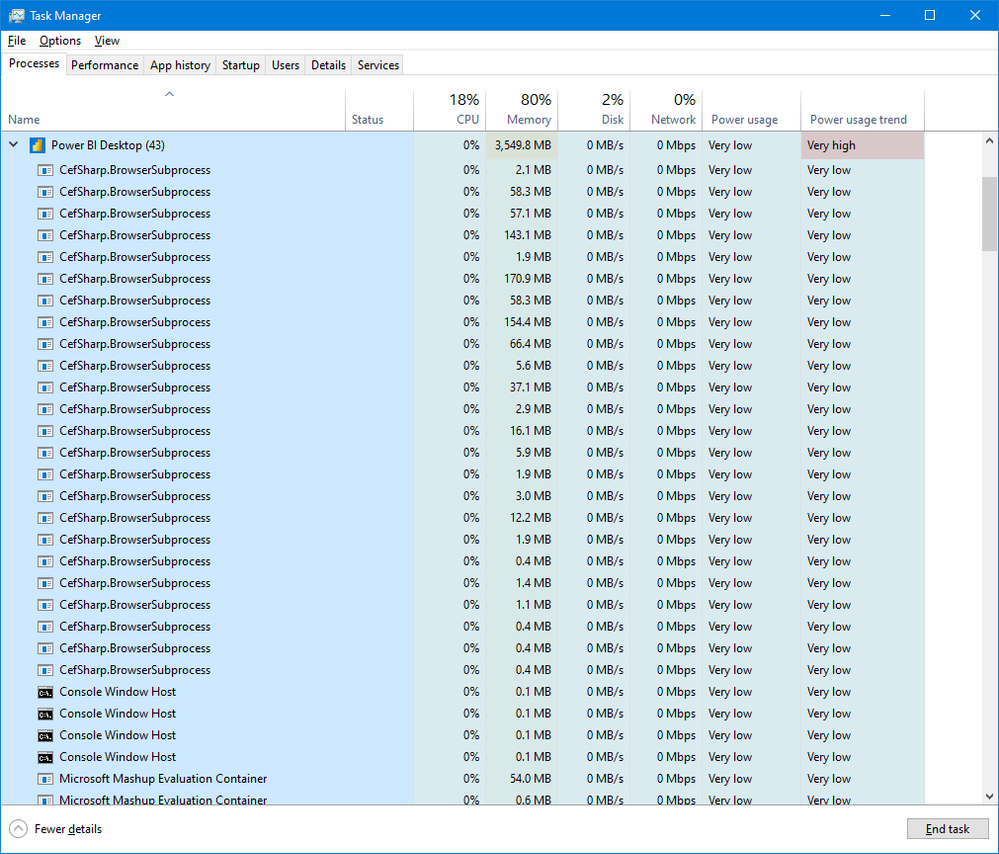
Regards
Phil
Did I answer your question? Then please mark my post as the solution.
If I helped you, click on the Thumbs Up to give Kudos.
Blog :: YouTube Channel :: Connect on Linkedin
Proud to be a Super User!
- Mark as New
- Bookmark
- Subscribe
- Mute
- Subscribe to RSS Feed
- Permalink
- Report Inappropriate Content
Should Power BI Desktop be configured to use a proxy? Where would I enter "CefSharp.BrowserSubprocess part"? Seems like I have to add a proxy server to this Proxifier. I have to admit I have no idea. I watched videos, but they show some IPs, some ports. Where all of this is coming from? Do I have to add a proxy server to my box?
- Mark as New
- Bookmark
- Subscribe
- Mute
- Subscribe to RSS Feed
- Permalink
- Report Inappropriate Content
Hi @Markzolotoy
Try Proxifier
Proxifier - The Most Advanced Proxy Client
It will capture all traffic from all processes.
What you are looking for is the CefSharp.BrowserSubprocess part of PBI Desktop.
Regards
Phil
Did I answer your question? Then please mark my post as the solution.
If I helped you, click on the Thumbs Up to give Kudos.
Blog :: YouTube Channel :: Connect on Linkedin
Proud to be a Super User!
- Mark as New
- Bookmark
- Subscribe
- Mute
- Subscribe to RSS Feed
- Permalink
- Report Inappropriate Content
Should Power BI Desktop be configured to use a proxy? Where would I enter "CefSharp.BrowserSubprocess part"? Seems like I have to add a proxy server to this Proxifier. I have to admit I have no idea. I watched videos, but they show some IPs, some ports. Where all of this is coming from? Do I have to add a proxy server to my box?
- Mark as New
- Bookmark
- Subscribe
- Mute
- Subscribe to RSS Feed
- Permalink
- Report Inappropriate Content
Fiddler has its default configuration. What is happening is that it does not intercept traffic that goes from non-browsers processes. It seems like Power BI desktop is not proxy aware. I found this:
Using Data Explorer behind a proxy - solution (microsoft.com)
but not sure if it's the way to go.
- Mark as New
- Bookmark
- Subscribe
- Mute
- Subscribe to RSS Feed
- Permalink
- Report Inappropriate Content
Hi @Markzolotoy
Please clarify what you mean by local system? Your own PC? Your local network?
Have you got Fiddler configured to intercept traffic going to localhost (your own PC)? Or is it just intercepting web traffic heading out to the internet?
Did I answer your question? Then please mark my post as the solution.
If I helped you, click on the Thumbs Up to give Kudos.
Blog :: YouTube Channel :: Connect on Linkedin
Proud to be a Super User!
- Mark as New
- Bookmark
- Subscribe
- Mute
- Subscribe to RSS Feed
- Permalink
- Report Inappropriate Content
Anybody, any idea? I am stuck with this. NO matter what I do, Fiddler ins not catching calls to local APIs.

Helpful resources

Fabric Data Days 2026
Don't miss out on Data Days, June 15 through August 7. Learn Fabric, Power BI, SQL, AI and more.

Power BI Monthly Update - May 2026
Check out the May 2026 Power BI update to learn about new features.

Power BI DataViz World Championships - June 2026
A new Power BI DataViz World Championship is coming this June! Don't miss out on submitting your entry.

| User | Count |
|---|---|
| 23 | |
| 23 | |
| 21 | |
| 17 | |
| 14 |


| User | Count |
|---|---|
| 58 | |
| 50 | |
| 37 | |
| 29 | |
| 24 |


