
cancel
Showing results for 
Search instead for 
Did you mean: 

Get Fabric Certified for FREE during Fabric Data Days. Don't miss your chance! Request now

Reply
curiouspbix0
Helper IV
Helper IV

Dax Aggregation Issue


Hello Daxers,


Running into an aggregation here, first table shows raw data, second table is the dax measure which computes correctly when Status column is not used in the table.


Actual is skewed when Status is added to the table, where did this go wrong ?


Raw Data

VehicleStatusVehicle Count
BikesRunning10
BikesActive20
BikesOOO8
CarsRunning10
CarsActive23
CarsOOO11
BoatsRunning100
BoatsActive30
BoatsOOO9
OtherRunning2

Actual = COUNTROWS(DISTINCT(TableVehicle[VehicleID]))
,FILTER(ALL(TableVehicle[Status])
,TableVehicle[VehicleStatus]="Running"
|| TableVehicle[VehicleStatus]="Active")
)

Raw Data with DAX

VehicleActual 
Bikes30
Cars33
Boats130
Other2


Actual Result Table - Incorrect

VehicleStatusActual
BikesRunning30
BikesActive30
BikesOOO30
CarsRunning33
CarsActive33
CarsOOO33
BoatsRunning130
BoatsActive130
BoatsOOO130
OtherRunning2


What DAX for field Status would result in the below table.


Expected Result Table - Correct

VehicleStatus Actual
BikesRunning10
BikesActive20
CarsRunning10
CarsActive23
BoatsRunning100
BoatsActive30
OtherRunning2


1 ACCEPTED SOLUTION
Anonymous
Not applicable

Hi @curiouspbix0 ,

You can create a measure as below:

Actual =
CALCULATE (
    SUM ( 'TableVehicle'[Vehicle Count] ),
    FILTER ( 'TableVehicle', 'TableVehicle'[Status] IN { "Running", "Active" } )
)

yingyinr_0-1623832254783.png

Best Regards

View solution in original post

4 REPLIES 4
Anonymous
Not applicable

Hi @curiouspbix0 ,

You can create a measure as below:

Actual =
CALCULATE (
    SUM ( 'TableVehicle'[Vehicle Count] ),
    FILTER ( 'TableVehicle', 'TableVehicle'[Status] IN { "Running", "Active" } )
)

yingyinr_0-1623832254783.png

Best Regards

Singaravelu_R
Resolver III
Resolver III

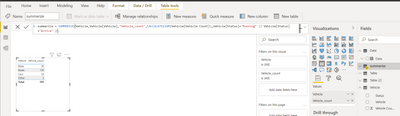
In modeling click Net Table (write a dax expression to create new table) and write summarize DAX as per blow screenshot,


Singaravelu_R_0-1623669685026.png


amitchandak
Super User
Super User

@curiouspbix0 , remove all and try


Actual = COUNTROWS(DISTINCT(TableVehicle[VehicleID]))
,FILTER((TableVehicle)
,TableVehicle[VehicleStatus] in{"Running","Active"})
)


or

with allselected


Actual = COUNTROWS(DISTINCT(TableVehicle[VehicleID]))
,FILTER(allselected(TableVehicle)
,TableVehicle[VehicleStatus] in{"Running","Active"})
)

Share with Power BI Enthusiasts: Full Power BI Video (20 Hours) YouTube
Microsoft Fabric Series 60+ Videos YouTube
Microsoft Fabric Hindi End to End YouTube

ALLSELECTED did not work and cannot remove ALL together on Filter condition. 


Helpful resources

Announcements
November Power BI Update Carousel

Power BI Monthly Update - November 2025

Check out the November 2025 Power BI update to learn about new features.

Fabric Data Days Carousel

Fabric Data Days

Advance your Data & AI career with 50 days of live learning, contests, hands-on challenges, study groups & certifications and more!

FabCon Atlanta 2026 carousel

FabCon Atlanta 2026

Join us at FabCon Atlanta, March 16-20, for the ultimate Fabric, Power BI, AI and SQL community-led event. Save $200 with code FABCOMM.

Top Solution Authors
Top Kudoed Authors