Don't miss your chance to take the Fabric Data Engineer (DP-600) exam for FREE! Find out how by attending the DP-600 session on April 23rd (pacific time), live or on-demand.
Learn moreJoin the FabCon + SQLCon recap series. Up next: Power BI, Real-Time Intelligence, IQ and AI, and Data Factory take center stage. All sessions are available on-demand after the live show. Register now
Hello Daxers,
Running into an aggregation here, first table shows raw data, second table is the dax measure which computes correctly when Status column is not used in the table.
Actual is skewed when Status is added to the table, where did this go wrong ?
Raw Data
| Vehicle | Status | Vehicle Count |
| Bikes | Running | 10 |
| Bikes | Active | 20 |
| Bikes | OOO | 8 |
| Cars | Running | 10 |
| Cars | Active | 23 |
| Cars | OOO | 11 |
| Boats | Running | 100 |
| Boats | Active | 30 |
| Boats | OOO | 9 |
| Other | Running | 2 |
Actual = COUNTROWS(DISTINCT(TableVehicle[VehicleID]))
,FILTER(ALL(TableVehicle[Status])
,TableVehicle[VehicleStatus]="Running"
|| TableVehicle[VehicleStatus]="Active")
)
Raw Data with DAX
| Vehicle | Actual |
| Bikes | 30 |
| Cars | 33 |
| Boats | 130 |
| Other | 2 |
Actual Result Table - Incorrect
| Vehicle | Status | Actual |
| Bikes | Running | 30 |
| Bikes | Active | 30 |
| Bikes | OOO | 30 |
| Cars | Running | 33 |
| Cars | Active | 33 |
| Cars | OOO | 33 |
| Boats | Running | 130 |
| Boats | Active | 130 |
| Boats | OOO | 130 |
| Other | Running | 2 |
What DAX for field Status would result in the below table.
Expected Result Table - Correct
| Vehicle | Status | Actual |
| Bikes | Running | 10 |
| Bikes | Active | 20 |
| Cars | Running | 10 |
| Cars | Active | 23 |
| Boats | Running | 100 |
| Boats | Active | 30 |
| Other | Running | 2 |
Solved! Go to Solution.
Hi @curiouspbix0 ,
You can create a measure as below:
Actual =
CALCULATE (
SUM ( 'TableVehicle'[Vehicle Count] ),
FILTER ( 'TableVehicle', 'TableVehicle'[Status] IN { "Running", "Active" } )
)
Best Regards
Hi @curiouspbix0 ,
You can create a measure as below:
Actual =
CALCULATE (
SUM ( 'TableVehicle'[Vehicle Count] ),
FILTER ( 'TableVehicle', 'TableVehicle'[Status] IN { "Running", "Active" } )
)
Best Regards
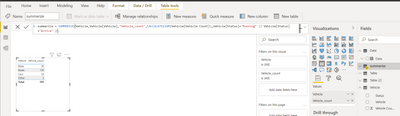
In modeling click Net Table (write a dax expression to create new table) and write summarize DAX as per blow screenshot,
@curiouspbix0 , remove all and try
Actual = COUNTROWS(DISTINCT(TableVehicle[VehicleID]))
,FILTER((TableVehicle)
,TableVehicle[VehicleStatus] in{"Running","Active"})
)
or
with allselected
Actual = COUNTROWS(DISTINCT(TableVehicle[VehicleID]))
,FILTER(allselected(TableVehicle)
,TableVehicle[VehicleStatus] in{"Running","Active"})
)
ALLSELECTED did not work and cannot remove ALL together on Filter condition.
Check out the April 2026 Power BI update to learn about new features.
If you have recently started exploring Fabric, we'd love to hear how it's going. Your feedback can help with product improvements.
A new Power BI DataViz World Championship is coming this June! Don't miss out on submitting your entry.
| User | Count |
|---|---|
| 48 | |
| 40 | |
| 37 | |
| 20 | |
| 16 |
| User | Count |
|---|---|
| 69 | |
| 67 | |
| 32 | |
| 27 | |
| 26 |