
This time we’re going bigger than ever. Fabric, Power BI, SQL, AI and more. We're covering it all. You won't want to miss it.
Learn moreGet Fabric Certified for FREE during AI Skills Fest. This week only. Secure your voucher now.
Hello Daxers,
Running into an aggregation here, first table shows raw data, second table is the dax measure which computes correctly when Status column is not used in the table.
Actual is skewed when Status is added to the table, where did this go wrong ?
Raw Data
| Vehicle | Status | Vehicle Count |
| Bikes | Running | 10 |
| Bikes | Active | 20 |
| Bikes | OOO | 8 |
| Cars | Running | 10 |
| Cars | Active | 23 |
| Cars | OOO | 11 |
| Boats | Running | 100 |
| Boats | Active | 30 |
| Boats | OOO | 9 |
| Other | Running | 2 |
Actual = COUNTROWS(DISTINCT(TableVehicle[VehicleID]))
,FILTER(ALL(TableVehicle[Status])
,TableVehicle[VehicleStatus]="Running"
|| TableVehicle[VehicleStatus]="Active")
)
Raw Data with DAX
| Vehicle | Actual |
| Bikes | 30 |
| Cars | 33 |
| Boats | 130 |
| Other | 2 |
Actual Result Table - Incorrect
| Vehicle | Status | Actual |
| Bikes | Running | 30 |
| Bikes | Active | 30 |
| Bikes | OOO | 30 |
| Cars | Running | 33 |
| Cars | Active | 33 |
| Cars | OOO | 33 |
| Boats | Running | 130 |
| Boats | Active | 130 |
| Boats | OOO | 130 |
| Other | Running | 2 |
What DAX for field Status would result in the below table.
Expected Result Table - Correct
| Vehicle | Status | Actual |
| Bikes | Running | 10 |
| Bikes | Active | 20 |
| Cars | Running | 10 |
| Cars | Active | 23 |
| Boats | Running | 100 |
| Boats | Active | 30 |
| Other | Running | 2 |
Solved! Go to Solution.
Hi @curiouspbix0 ,
You can create a measure as below:
Actual =
CALCULATE (
SUM ( 'TableVehicle'[Vehicle Count] ),
FILTER ( 'TableVehicle', 'TableVehicle'[Status] IN { "Running", "Active" } )
)
Best Regards
Hi @curiouspbix0 ,
You can create a measure as below:
Actual =
CALCULATE (
SUM ( 'TableVehicle'[Vehicle Count] ),
FILTER ( 'TableVehicle', 'TableVehicle'[Status] IN { "Running", "Active" } )
)
Best Regards
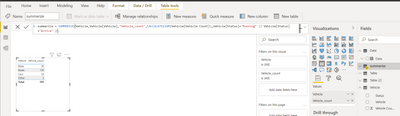
In modeling click Net Table (write a dax expression to create new table) and write summarize DAX as per blow screenshot,
@curiouspbix0 , remove all and try
Actual = COUNTROWS(DISTINCT(TableVehicle[VehicleID]))
,FILTER((TableVehicle)
,TableVehicle[VehicleStatus] in{"Running","Active"})
)
or
with allselected
Actual = COUNTROWS(DISTINCT(TableVehicle[VehicleID]))
,FILTER(allselected(TableVehicle)
,TableVehicle[VehicleStatus] in{"Running","Active"})
)
ALLSELECTED did not work and cannot remove ALL together on Filter condition.
Check out the May 2026 Power BI update to learn about new features.
Sign up to receive a private message when registration opens and key events begin.
If you have recently started exploring Fabric, we'd love to hear how it's going. Your feedback can help with product improvements.
| User | Count |
|---|---|
| 25 | |
| 24 | |
| 22 | |
| 21 | |
| 19 |
| User | Count |
|---|---|
| 52 | |
| 48 | |
| 47 | |
| 22 | |
| 21 |