cancel
Showing results for 
Search instead for 
Did you mean: 

The Power BI Data Visualization World Championships is back! Get ahead of the game and start preparing now! Learn more

Reply
mssqlsage
Regular Visitor

Datesbetween behavior

Hi everyone,
 
 I'm attempting to return the sum of  [Demand] as below, but limit it to only 7 weeks worth of values.  I have a slicer on [TheDate], which is set to 10/18/2020.
 
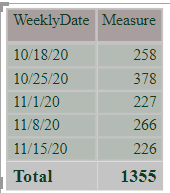
If I hard code in "2020-11-17" as the end date, I get what I expect:
Measure = VAR minDate = MIN('dim DatePeriod'[TheDate])
VAR EndDate = DATE(Year(minDate), MONTH(minDate), DAY(minDate) + 49)

RETURN
CALCULATE(SUM('fact Allocation'[Demand]),DATESBETWEEN('dim DatePeriod'[TheDate],minDate,"2020-11-17"))
 

 CorrectCorrect


The result set stops at 11/15/20.


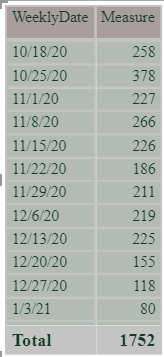
If I use what I think is the MaxDate calculation, it does not stop at the expected point:


Measure = VAR minDate = MIN('dim DatePeriod'[TheDate])
VAR EndDate = DATE(Year(minDate), MONTH(minDate), DAY(minDate) + 49)

RETURN
CALCULATE(SUM('fact Allocation'[Demand]),DATESBETWEEN('dim DatePeriod'[TheDate],minDate,EndDate))
 

I'm attempting to just add 49 days to the mindate, then use that as the maximum date.  But the list goes on until the end of the entire dataset.


IncorrectIncorrect

 Any help would be greatly appreciated !


Thanks,

Jeff

4 REPLIES 4
Anonymous
Not applicable

Hi @mssqlsage,

I'd like some dummy data with raw table structure to test, it should help us clarify your structure and test to coding formula.

How to Get Your Question Answered Quickly 

Regards,

Xiaxoin Sheng

amitchandak
Super User
Super User

@mssqlsage , If you do not control by a slicer or relative date slicer or filter, then that video of 12month is an example of how to control.

https://www.youtube.com/watch?v=duMSovyosXE

Share with Power BI Enthusiasts: Full Power BI Video (20 Hours) YouTube
Microsoft Fabric Series 60+ Videos YouTube
Microsoft Fabric Hindi End to End YouTube
mssqlsage
Regular Visitor

Hi @amitchandak ,


 Thank you for the solution.  This is an approach I had not considered.  I have added the appropriate columns to the date table, and using the following measure in an attempt to limit the results to the next 7 weeks after the slicer selection:


MyMeasureThatWorks =
CALCULATE(SUM('fact Allocation'[Demand]), FILTER(ALL('dim Date'),'dim Date'[Week Rank] >= max('dim Date'[Week Rank]) && 'dim Date'[Week Rank]<=max('dim Date'[Week Rank])+7))
 
PBI-3.png
 
I think I may still be off on the measure calculations, as not getting the 7-week limited data set expected.
amitchandak
Super User
Super User

@mssqlsage , Not very clear. But you can create week in your date table and work on week instead of dates


new columns in date table 

Start Year = STARTOFYEAR('Date'[Date],"3/31")
WeekDay = WEEKDAY([Date],2) //monday
Start of Week = [Date] -[WeekDay]+1 //monday
FY Year = YEAR('Date'[Start Year]) // use end year
FY Week = QUOTIENT(DATEDIFF(Minx(FILTER('Date',[FY Year]=EARLIER([FY Year])),'Date'[Start of Week]),[Date],DAY),7)+1

Week Start date = 'Date'[Date]+-1*WEEKDAY('Date'[Date],2)+1
Week End date = 'Date'[Date]+ 7-1*WEEKDAY('Date'[Date],2)
Week Rank = RANKX(all('Date'),'Date'[Week Start date],,ASC,Dense)


measures
This Week = CALCULATE(sum('order'[Qty]), FILTER(ALL('Date'),'Date'[Week Rank]=max('Date'[Week Rank])))
Last Week = CALCULATE(sum('order'[Qty]), FILTER(ALL('Date'),'Date'[Week Rank]=max('Date'[Week Rank])-1))
Last year Week= CALCULATE(sum('order'[Qty]), FILTER(ALL('Date'),'Date'[Week Rank]=(max('Date'[Week Rank]) -52)))
Last 7 weeks = CALCULATE(sum('order'[Qty]), FILTER(ALL('Date'),'Date'[Week Rank]>=max('Date'[Week Rank])-7 && 'Date'[Week Rank]<=max('Date'[Week Rank])))
last two weeks = CALCULATE(sum('order'[Qty]), FILTER(ALL('Date'),'Date'[Week Rank]<=max('Date'[Week Rank])-1


Also, refer if data is getting clubbed into one row

https://www.youtube.com/watch?v=duMSovyosXE

Share with Power BI Enthusiasts: Full Power BI Video (20 Hours) YouTube
Microsoft Fabric Series 60+ Videos YouTube
Microsoft Fabric Hindi End to End YouTube
Helpful resources

Announcements
Power BI DataViz World Championships

Power BI Dataviz World Championships

The Power BI Data Visualization World Championships is back! Get ahead of the game and start preparing now!

December 2025 Power BI Update Carousel

Power BI Monthly Update - December 2025

Check out the December 2025 Power BI Holiday Recap!

FabCon Atlanta 2026 carousel

FabCon Atlanta 2026

Join us at FabCon Atlanta, March 16-20, for the ultimate Fabric, Power BI, AI and SQL community-led event. Save $200 with code FABCOMM.