

cancel
Showing results for 
Search instead for 
Did you mean: 

The Power BI Data Visualization World Championships is back! Get ahead of the game and start preparing now! Learn more

Reply
SabineOussi
Skilled Sharer
Skilled Sharer

Dates Raking with Selection

Hello,


I have a set of orders made by different departments and I am trying to rank them according to the sequence of orders (1st, 2nd, 3rd, ...) and the dates.


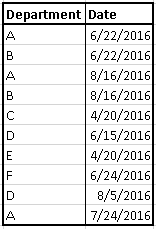
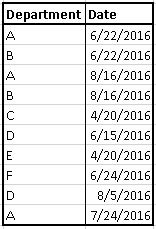
Here's a sample of the data

SAMPLE.PNG


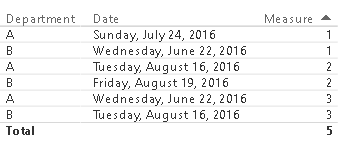
If I want to choose only departments A and B, I should get this

AB.PNG

B, D, and E

BDE.PNG


etc.


I saw this post http://community.powerbi.com/t5/Desktop/DAX-Ranking-or-Indexing-Dates/m-p/41239#M15579 but couldn't get to the solution I want.


Any help is appreciated.
Thank you.


5 REPLIES 5
AlexChen
Microsoft Employee
Microsoft Employee

Hi,


You can create a numeric calculate column for Date.


Column = VALUE(YEAR(Department[Date]) & if(MONTH(Department[Date]) < 10, "0" & MONTH(Department[Date]), MONTH(Department[Date])) & if(DAY(Department[Date]) < 10, "0" & DAY(Department[Date]), DAY(Department[Date])))


Then create a Rank measure within each Department group.


Measure = RANKX(ALLEXCEPT(Department,Department[Department]),CALCULATE(sum(Department[Column])),,ASC, Dense) - 1


This is the result:


1.png


2.png


3.png


Best Regards

Alex


Thank you Alex.


Your solution functions perfeclty when I have distinct dates.

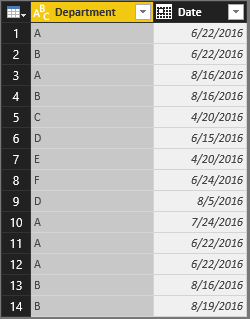
But when I have the same date for the same department, measure does not work as it should.

Multiple Dates.PNG

Multiple Dates Data.PNG


Any suggestions on how to fix this?

Thanks again.

Hi,


If you have only 2 columns in Department table, I suggest you using following code to remove duplicated records in a new table.


Department2 = DISTINCT(Department)


Then create the same “Column” and “Measure” just as I wrote in my reply above for Department2.


Best Regards

Alex


Thank you Alex for your help.


The thing is they are not duplicated records. Only the department and the date are the same while other columns like quantity and description differ. So a department can make many orders during the same day, that's why I cannot remove any record.


I'm not sure if this is feasible...


Thanks.

SabineOussi
Skilled Sharer
Skilled Sharer

Hello, 


I have a set of orders made by different departments and I am trying to rank them according to the sequence of orders (1st, 2nd, 3rd, ...) and the dates.


Here's a sample of the data

SAMPLE.PNG


If I want to choose only departments A and B, I should get this

AB.PNG


B, D, and E

BDE.PNG

etc.


I saw this post http://community.powerbi.com/t5/Desktop/DAX-Ranking-or-Indexing-Dates/m-p/41239#M15579 but couldn't get to the solution I want.


Any help is appreciated.

Thank you.

Helpful resources

Announcements
Power BI DataViz World Championships

Power BI Dataviz World Championships

The Power BI Data Visualization World Championships is back! Get ahead of the game and start preparing now!

December 2025 Power BI Update Carousel

Power BI Monthly Update - December 2025

Check out the December 2025 Power BI Holiday Recap!

FabCon Atlanta 2026 carousel

FabCon Atlanta 2026

Join us at FabCon Atlanta, March 16-20, for the ultimate Fabric, Power BI, AI and SQL community-led event. Save $200 with code FABCOMM.