

Don't miss your chance to take the Fabric Data Engineer (DP-700) exam on us!
Learn moreWe've captured the moments from FabCon & SQLCon that everyone is talking about, and we are bringing them to the community, live and on-demand. Starts on April 14th. Register now
Hello,
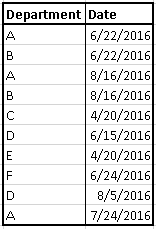
I have a set of orders made by different departments and I am trying to rank them according to the sequence of orders (1st, 2nd, 3rd, ...) and the dates.
Here's a sample of the data
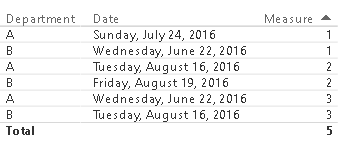
If I want to choose only departments A and B, I should get this
B, D, and E
etc.
I saw this post http://community.powerbi.com/t5/Desktop/DAX-Ranking-or-Indexing-Dates/m-p/41239#M15579 but couldn't get to the solution I want.
Any help is appreciated.
Thank you.
Hi,
You can create a numeric calculate column for Date.
Column = VALUE(YEAR(Department[Date]) & if(MONTH(Department[Date]) < 10, "0" & MONTH(Department[Date]), MONTH(Department[Date])) & if(DAY(Department[Date]) < 10, "0" & DAY(Department[Date]), DAY(Department[Date])))
Then create a Rank measure within each Department group.
Measure = RANKX(ALLEXCEPT(Department,Department[Department]),CALCULATE(sum(Department[Column])),,ASC, Dense) - 1
This is the result:
Best Regards
Alex
Thank you Alex.
Your solution functions perfeclty when I have distinct dates.
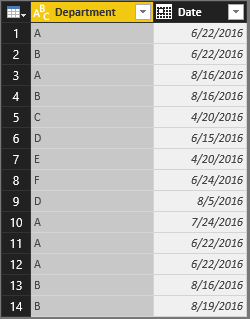
But when I have the same date for the same department, measure does not work as it should.
Any suggestions on how to fix this?
Thanks again.
Hi,
If you have only 2 columns in Department table, I suggest you using following code to remove duplicated records in a new table.
Department2 = DISTINCT(Department)
Then create the same “Column” and “Measure” just as I wrote in my reply above for Department2.
Best Regards
Alex
Thank you Alex for your help.
The thing is they are not duplicated records. Only the department and the date are the same while other columns like quantity and description differ. So a department can make many orders during the same day, that's why I cannot remove any record.
I'm not sure if this is feasible...
Thanks.
Hello,
I have a set of orders made by different departments and I am trying to rank them according to the sequence of orders (1st, 2nd, 3rd, ...) and the dates.
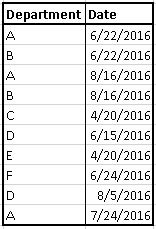
Here's a sample of the data
If I want to choose only departments A and B, I should get this
B, D, and E
etc.
I saw this post http://community.powerbi.com/t5/Desktop/DAX-Ranking-or-Indexing-Dates/m-p/41239#M15579 but couldn't get to the solution I want.
Any help is appreciated.
Thank you.
If you have recently started exploring Fabric, we'd love to hear how it's going. Your feedback can help with product improvements.
A new Power BI DataViz World Championship is coming this June! Don't miss out on submitting your entry.
Share feedback directly with Fabric product managers, participate in targeted research studies and influence the Fabric roadmap.
| User | Count |
|---|---|
| 57 | |
| 38 | |
| 35 | |
| 19 | |
| 17 |
| User | Count |
|---|---|
| 74 | |
| 70 | |
| 37 | |
| 35 | |
| 25 |