cancel
Showing results for 
Search instead for 
Did you mean: 

Learn from the best! Meet the four finalists headed to the FINALS of the Power BI Dataviz World Championships! Register now

Reply
DvdGz
New Member

Date language

Dear forum


I have a PowerBI report created with a desktop version with the application in one language (Spanish for example) and all the dates are in this language, for example the Months. Now we need to show the report in another language (English) and we are not able to change the language of the months. We have changed the desktop version to the right language without results and we don't want to create again the report.


The data source is allways in numeric format the problem is with the translation to months, like September, August, etc..


We think the problem is related with the temporary tables created by Power BI in the first version, Options -> Data Load -> Auto Date/Time.


Any Idea??


Thanks.

David


2 REPLIES 2
ChrisMendoza
Resident Rockstar
Resident Rockstar

hello @DvdGz


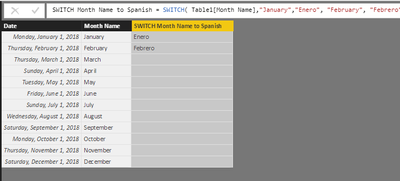
Doing a search, it looks like there is no built in solution to help you out without downloading a locale for English. Possibly a SWITCH( ) will work for you?


SWITCH Month Name to Spanish = SWITCH( Table1[Month Name],"January","Enero", "February", "Febrero" ...etc...)


1.PNG


Did I answer your question? Mark my post as a solution!
Did my answers help arrive at a solution? Give it a kudos by clicking the Thumbs Up!

Proud to be a Super User!


DvdGz
New Member

Dear forum


I have a PowerBI report created with a desktop version with the application in one language (Spanish for example) and all the dates are in this language, for example the Months. Now we need to show the report in another language (English) and we are not able to change the language of the months. We have changed the desktop version to the right language without results and we don't want to create again the report.


The data source is allways in numeric format the problem is with the translation to months, like September, August, etc..


We think the problem is related with the temporary tables created by Power BI in the first version, Options -> Data Load -> Auto Date/Time.


Any Idea??


Thanks.

David


Helpful resources

Announcements
Join our Fabric User Panel

Join our Fabric User Panel

Share feedback directly with Fabric product managers, participate in targeted research studies and influence the Fabric roadmap.

March Power BI Update Carousel

Power BI Community Update - March 2026

Check out the March 2026 Power BI update to learn about new features.