cancel
Showing results for 
Search instead for 
Did you mean: 

We've captured the moments from FabCon & SQLCon that everyone is talking about, and we are bringing them to the community, live and on-demand. Starts on April 14th. Register now

Reply
cshowe80
Helper I
Helper I

Date Including Hours Magically

I've got a simple question and I'm hoping you all can once again help me out. I've been replicating a report from 2016 for 2017. New dataset, I'm the new owner and I've had great success. There is one item however that I just can't seem to figure out. 


I've got a number of tabs in my Excel file (2017 Delivery, 2016 Delivery, Geo Data, 2017 Delivery by Section, etc) and I've created a DATE tab so I could link everything with a relationship. My date tab is a straight forwad column with dates from 1/1/2015 - 12/31/2019 which I created using FILL SERIES in Excel. In Excel they are 'DATE TYPE' as well as in PowerBI Tables editor I've set every date field in every table to the correct format (mm/dd/yyyy). 


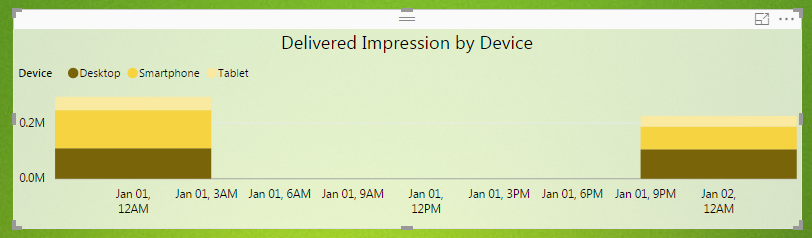
Now when I create a stacked column chart it's magically creating hourly data. I've got:
 

PowerBI_Data_Troubles.PNG

January 1, 12am

January 1, 3am

January 1, 6am

January 1, 9am

January 1, 12pm

January 1, 3pm

January 1, 6pm

January 1, 9pm


PowerBI_Data_Troubles2.PNG


Now I've only got 2 days worth of data for this year so I expected the graphs to look different however I'm lost as to why and where the 3 hour segmentation of my date data has come from. Here are the screenshots of 2016 (former collegue) and 2017 (with magical 3 hour segments).


Any help would be greatly appreciated. 


1 ACCEPTED SOLUTION
Baskar
Resident Rockstar
Resident Rockstar

Cool , 


This is one of feature in Power BI.


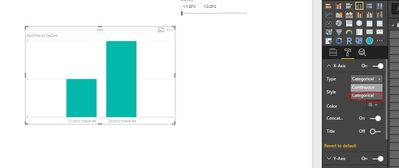
U have to change the X-Axis Setting . look the attachment it will help u .

1.JPG


 change Continuous to categorical .


View solution in original post

2 REPLIES 2
Baskar
Resident Rockstar
Resident Rockstar

Cool , 


This is one of feature in Power BI.


U have to change the X-Axis Setting . look the attachment it will help u .

1.JPG


 change Continuous to categorical .


Thanks I missed that setting lurking under the submenu. Working perfectly now

Helpful resources

Announcements
New to Fabric survey Carousel

New to Fabric Survey

If you have recently started exploring Fabric, we'd love to hear how it's going. Your feedback can help with product improvements.

Power BI DataViz World Championships carousel

Power BI DataViz World Championships - June 2026

A new Power BI DataViz World Championship is coming this June! Don't miss out on submitting your entry.

Join our Fabric User Panel

Join our Fabric User Panel

Share feedback directly with Fabric product managers, participate in targeted research studies and influence the Fabric roadmap.