
Learn from the best! Meet the four finalists headed to the FINALS of the Power BI Dataviz World Championships! Register now
Hi
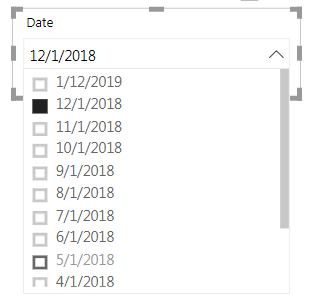
I am currently working on a dashboard and want to put the date column in the dropdown slicer.
However, when I put new date into the Excel data file and refresh the dashboard, the date slicer still choose my previous chosen date (12/1/2018), not the most updated one (1/1/2019).
Is there any way that my dropdown date slicer will choose the latest date automatically?
Solved! Go to Solution.
HI, @Anonymous
Now when you log out of Power BI and come back to a report, the same items will be selected as when you left.
So for your requirement, it couldn't achieve that set a default value(or maxdate) for a slicer.
and as a workaround, you add a column to judge if the date is max date then set it in visual/page/report level filter or create a measure do the same work. eg. https://community.powerbi.com/t5/Service/How-to-set-a-time-slicer-to-select-the-latest-date-in-default/td-p/319202
Best Regards,
Lin
hi, @Anonymous
Could you please tell me if your problem has been solved? If it is, could you please mark the helpful replies as Answered? ![]()
Best Regards,
Lin
HI, @Anonymous
Now when you log out of Power BI and come back to a report, the same items will be selected as when you left.
So for your requirement, it couldn't achieve that set a default value(or maxdate) for a slicer.
and as a workaround, you add a column to judge if the date is max date then set it in visual/page/report level filter or create a measure do the same work. eg. https://community.powerbi.com/t5/Service/How-to-set-a-time-slicer-to-select-the-latest-date-in-default/td-p/319202
Best Regards,
Lin
A new Power BI DataViz World Championship is coming this June! Don't miss out on submitting your entry.
Share feedback directly with Fabric product managers, participate in targeted research studies and influence the Fabric roadmap.
| User | Count |
|---|---|
| 47 | |
| 35 | |
| 28 | |
| 17 | |
| 16 |
| User | Count |
|---|---|
| 59 | |
| 58 | |
| 40 | |
| 22 | |
| 20 |