Join us at FabCon Atlanta from March 16 - 20, 2026, for the ultimate Fabric, Power BI, AI and SQL community-led event. Save $200 with code FABCOMM.
Register now!Vote for your favorite vizzies from the Power BI Dataviz World Championship submissions. Vote now!
Currently i'm reading the data from local xls file. Now I would like moving it to sharpoint folder.
Can i change the path without create new visual?
Solved! Go to Solution.
Hi @AlessandroBet ,
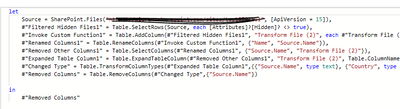
If these two files are the same, you can do it. You need to open Advanced Editor in the query editor then replace source with the m query of sharepoint(you can copy it from the code you connect to sharepoint).
Hi @AlessandroBet ,
If these two files are the same, you can do it. You need to open Advanced Editor in the query editor then replace source with the m query of sharepoint(you can copy it from the code you connect to sharepoint).
Vote for your favorite vizzies from the Power BI World Championship submissions!
If you love stickers, then you will definitely want to check out our Community Sticker Challenge!
Check out the January 2026 Power BI update to learn about new features.
| User | Count |
|---|---|
| 62 | |
| 50 | |
| 41 | |
| 20 | |
| 16 |
| User | Count |
|---|---|
| 124 | |
| 109 | |
| 47 | |
| 28 | |
| 27 |