cancel
Showing results for 
Search instead for 
Did you mean: 

Learn from the best! Meet the four finalists headed to the FINALS of the Power BI Dataviz World Championships! Register now

Reply
AlessandroBet
Helper V
Helper V

Data source setting

Currently i'm reading the data from local xls file. Now I would like moving it to sharpoint folder.

Can i change the path without create new visual?

1 ACCEPTED SOLUTION
v-eachen-msft
Community Support
Community Support

Hi @AlessandroBet ,


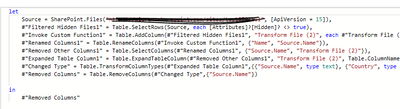
If these two files are the same, you can do it. You need to open Advanced Editor in the query editor then replace source with the m query of sharepoint(you can copy it from the code you connect to sharepoint).

2-1.PNG


Community Support Team _ Eads
If this post helps, then please consider Accept it as the solution to help the other members find it.

View solution in original post

1 REPLY 1
v-eachen-msft
Community Support
Community Support

Hi @AlessandroBet ,


If these two files are the same, you can do it. You need to open Advanced Editor in the query editor then replace source with the m query of sharepoint(you can copy it from the code you connect to sharepoint).

2-1.PNG


Community Support Team _ Eads
If this post helps, then please consider Accept it as the solution to help the other members find it.

Helpful resources

Announcements
Power BI DataViz World Championships carousel

Power BI DataViz World Championships - June 2026

A new Power BI DataViz World Championship is coming this June! Don't miss out on submitting your entry.

Join our Fabric User Panel

Join our Fabric User Panel

Share feedback directly with Fabric product managers, participate in targeted research studies and influence the Fabric roadmap.

March Power BI Update Carousel

Power BI Community Update - March 2026

Check out the March 2026 Power BI update to learn about new features.