cancel
Showing results for 
Search instead for 
Did you mean: 

The Power BI Data Visualization World Championships is back! Get ahead of the game and start preparing now! Learn more

Reply
Matthias93
Helper III
Helper III

Data refresh with empty SharePoint lists

Hi,


I have a query based on multiple SharePoint lists. Everything works just fine when there is data in the lists, however when I try to refresh my dashboard when one of the lists is empty I get an error message saying there is no 'ID column' to be found. It's not ideal to make sure there is always a line in the SharePoint list. I was wondering if there is a workaround for this issue.


Thanks in advance,


Matt

3 REPLIES 3
Anonymous
Not applicable

Hi @Matthias93,

Do you refresh your data in Power BI Desktop or in Power BI Service?

Based on my test, when we firstly import data from SharePoint lists and empty list into Power BI Desktop, empty SharePoint list will show as an empty table in Power BI Desktop. In this case, there are no issues when you refresh data in Power BI Desktop or refresh the dataset in Power BI Service.
1.PNG

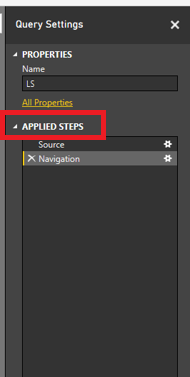
However, if I delete all items on one of my non-empty SharePoint list (for example: LS), then refresh data in Power BI Desktop or refresh the dataset in Power BI Service, I can reproduce your error. In this case, open query editor in Power BI Desktop, click on your query(LS in my scenario) , and you will see APPLIED STEPS in Query Setting panel, some steps(“Renamed Columns” in my scenario) should make changes to your columns, as long as you remove these steps, the error goes away. And if you get this error in Power BI Service, you will need to firstly handle this error in PBIX file and re-publish it to Service.
2.PNG


Thanks,
Lydia Zhang

Matthias93
Helper III
Helper III

Hi,


I have a query based on multiple SharePoint lists. Everything works just fine when there is data in the lists, however when I try to refresh my dashboard when one of the lists is empty I get an error message saying there is no 'ID column' to be found. It's not ideal to make sure there is always a line in the SharePoint list. I was wondering if there is a workaround for this issue.


Thanks in advance,


Matt

Anonymous
Not applicable

I had the same problem and found the best workaround is to create a "test" row in the Sharepoint list that always stays there and filter it out in the BI report.

Helpful resources

Announcements
November Power BI Update Carousel

Power BI Monthly Update - November 2025

Check out the November 2025 Power BI update to learn about new features.

Fabric Data Days Carousel

Fabric Data Days

Advance your Data & AI career with 50 days of live learning, contests, hands-on challenges, study groups & certifications and more!

FabCon Atlanta 2026 carousel

FabCon Atlanta 2026

Join us at FabCon Atlanta, March 16-20, for the ultimate Fabric, Power BI, AI and SQL community-led event. Save $200 with code FABCOMM.