cancel
Showing results for 
Search instead for 
Did you mean: 

The Power BI Data Visualization World Championships is back! Get ahead of the game and start preparing now! Learn more

Reply
Daxtothemax
Helper I
Helper I

Difference between two values in same column

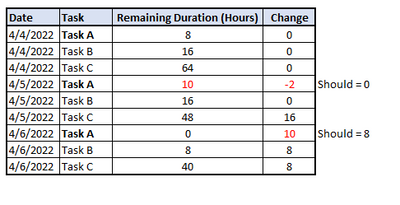
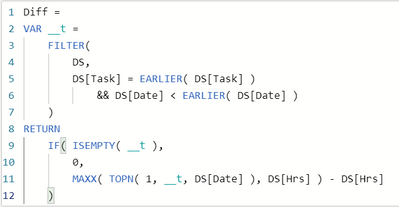
Looking for a way in Power BI to calculate the difference between values in the same column. Need the day over day change to the remaining duration. I have a formula that works but an issue has come up when durations are actually increased.  I would prefer to not show negative change and the change be based off the original duration only. Please see existing formula and example data below. 


Daxtothemax_0-1649275802839.png


Daxtothemax_1-1649275802829.png


Any help is greatly appreciated!

1 ACCEPTED SOLUTION
v-yanjiang-msft
Community Support
Community Support

Hi @Daxtothemax ,

According to your description, here's my solution.

Create a measure.

Diff2 =
VAR _Diff =
    CALCULATE (
        MAX ( 'DS'[Hrs] ),
        FILTER (
            'DS',
            'DS'[Task] = EARLIER ( 'DS'[Task] )
                && 'DS'[Date] = MINX ( ALL ( 'DS' ), 'DS'[Date] )
        )
    ) - 'DS'[Hrs]
RETURN
    IF ( _Diff < 0, 0, _Diff )

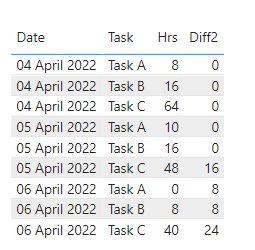
Get the expected result.

vkalyjmsft_0-1649730590900.png

I attach my sample below for reference.


Best Regards,
Community Support Team _ kalyj

If this post helps, then please consider Accept it as the solution to help the other members find it more quickly.

View solution in original post

2 REPLIES 2
v-yanjiang-msft
Community Support
Community Support

Hi @Daxtothemax ,

According to your description, here's my solution.

Create a measure.

Diff2 =
VAR _Diff =
    CALCULATE (
        MAX ( 'DS'[Hrs] ),
        FILTER (
            'DS',
            'DS'[Task] = EARLIER ( 'DS'[Task] )
                && 'DS'[Date] = MINX ( ALL ( 'DS' ), 'DS'[Date] )
        )
    ) - 'DS'[Hrs]
RETURN
    IF ( _Diff < 0, 0, _Diff )

Get the expected result.

vkalyjmsft_0-1649730590900.png

I attach my sample below for reference.


Best Regards,
Community Support Team _ kalyj

If this post helps, then please consider Accept it as the solution to help the other members find it more quickly.

@v-yanjiang-msft thank you for this! It's getting closer.  The only issue is that I need the difference between each date.  So example below Task C should equal 8 comparing to the previous date.  Any ideas on this?


Daxtothemax_0-1649775178347.png


Helpful resources

Announcements
Power BI DataViz World Championships

Power BI Dataviz World Championships

The Power BI Data Visualization World Championships is back! Get ahead of the game and start preparing now!

December 2025 Power BI Update Carousel

Power BI Monthly Update - December 2025

Check out the December 2025 Power BI Holiday Recap!

FabCon Atlanta 2026 carousel

FabCon Atlanta 2026

Join us at FabCon Atlanta, March 16-20, for the ultimate Fabric, Power BI, AI and SQL community-led event. Save $200 with code FABCOMM.

Top Solution Authors