Get certified for free when you join Fabric Data Days 2026 and dive into Fabric, Power BI, SQL, AI, and other essential data skills.
Join nowJuly 28 - August 9 | Final Round of the Power BI Dataviz World Championships. This is your chance. Learn more
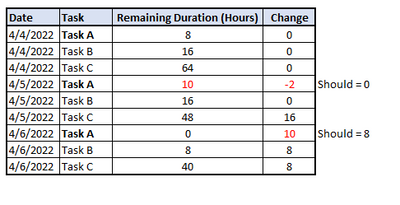
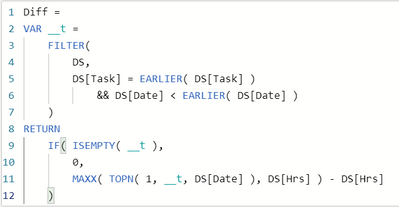
Looking for a way in Power BI to calculate the difference between values in the same column. Need the day over day change to the remaining duration. I have a formula that works but an issue has come up when durations are actually increased. I would prefer to not show negative change and the change be based off the original duration only. Please see existing formula and example data below.
Any help is greatly appreciated!
Solved! Go to Solution.
Hi @Daxtothemax ,
According to your description, here's my solution.
Create a measure.
Diff2 =
VAR _Diff =
CALCULATE (
MAX ( 'DS'[Hrs] ),
FILTER (
'DS',
'DS'[Task] = EARLIER ( 'DS'[Task] )
&& 'DS'[Date] = MINX ( ALL ( 'DS' ), 'DS'[Date] )
)
) - 'DS'[Hrs]
RETURN
IF ( _Diff < 0, 0, _Diff )
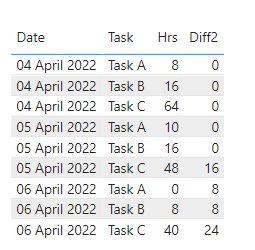
Get the expected result.
I attach my sample below for reference.
Best Regards,
Community Support Team _ kalyj
If this post helps, then please consider Accept it as the solution to help the other members find it more quickly.
Hi @Daxtothemax ,
According to your description, here's my solution.
Create a measure.
Diff2 =
VAR _Diff =
CALCULATE (
MAX ( 'DS'[Hrs] ),
FILTER (
'DS',
'DS'[Task] = EARLIER ( 'DS'[Task] )
&& 'DS'[Date] = MINX ( ALL ( 'DS' ), 'DS'[Date] )
)
) - 'DS'[Hrs]
RETURN
IF ( _Diff < 0, 0, _Diff )
Get the expected result.
I attach my sample below for reference.
Best Regards,
Community Support Team _ kalyj
If this post helps, then please consider Accept it as the solution to help the other members find it more quickly.
@v-yanjiang-msft thank you for this! It's getting closer. The only issue is that I need the difference between each date. So example below Task C should equal 8 comparing to the previous date. Any ideas on this?
If you love stickers, then you will definitely want to check out our community sticker challenge, Barcelona edition!
Check out the July 2026 Power BI update to learn about new features.
| User | Count |
|---|---|
| 28 | |
| 28 | |
| 19 | |
| 19 | |
| 19 |
| User | Count |
|---|---|
| 37 | |
| 29 | |
| 18 | |
| 17 | |
| 15 |