This is best Fabric, Power BI, SQL and AI community event. How do we know? The last event sold out! Save €200 with code FABCMTY200.
Register nowThe Fabric community is upgrading! Read all of the details including the timeline and what you can expect. Learn more
Hi all,
New to Power BI and have come across a dataset that I am exploring and have an issue that I don't know how to solve when it comes to modelling and building relationships.
I was hoping to get some help from the community.
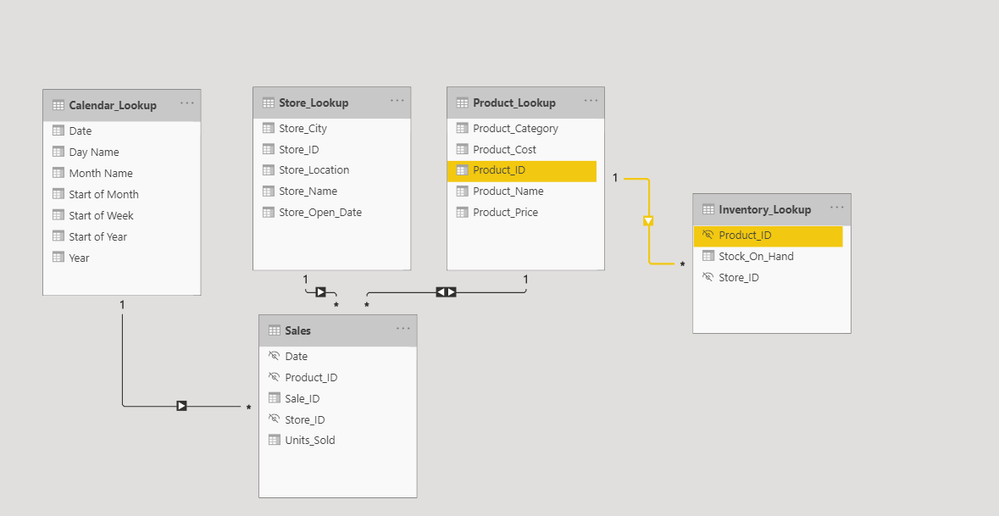
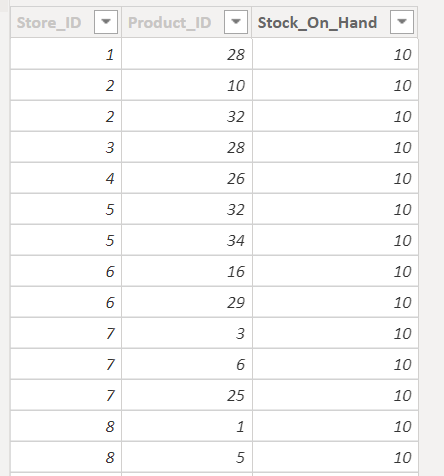
I have this table with three columns that I have renamed to "Inventory_Lookup" (see pic) that I'm not able to connect correctly. I have listed my questions below.
- Is this a lookup/dimension table? Or is it actually a fact/data table?
- How do I connect it properly since there are no unique values in the table? Have I done it the right way as shown in the picture (both directions from sales table to product_lookup and one to many from product_lookup to Inventory_lookup)?
Thanks in advance.
Solved! Go to Solution.
Hi @Clay82 ,
But, yes all the relationships in a data model depend on what you re planning to analyse in your report and at what granularity.
Thanks,
Pragati
Hi @Clay82 ,
But, yes all the relationships in a data model depend on what you re planning to analyse in your report and at what granularity.
Thanks,
Pragati
Join us in Barcelona for FabCon and SQLCon, the Fabric, Power BI, SQL, and AI community event. Save €200 with code FABCMTY200.
| User | Count |
|---|---|
| 24 | |
| 22 | |
| 20 | |
| 17 | |
| 14 |
| User | Count |
|---|---|
| 32 | |
| 26 | |
| 23 | |
| 20 | |
| 20 |