Join us at FabCon Atlanta from March 16 - 20, 2026, for the ultimate Fabric, Power BI, AI and SQL community-led event. Save $200 with code FABCOMM.
Register now!The Power BI Data Visualization World Championships is back! Get ahead of the game and start preparing now! Learn more
Hi,
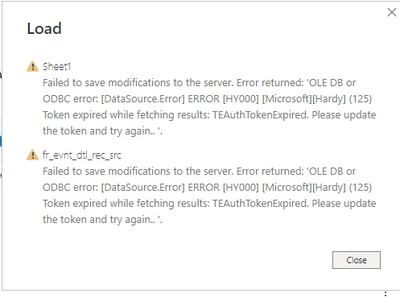
while loading 196M data to power bi desktop, getting an error- '[datassource error] error[HY000] [microsoft][hardy](125) Token expired while fetching result. TEAuthTokenExpired. please update the token and try again...'. Anyone please help me how to over come this.
Solved! Go to Solution.
Hi @Anonymous ,
I guessed right then 🙂
In Azure Databricks, there is a need to generate a token to connect to the the Hive tables.
That token has a lifetime of certain days if I am correct. You will need to re-generate the token again and give that token in Power BI Desktop in your connection settings, then the connection will refresh correctly.
Azure databricks
Hi @Anonymous ,
I guessed right then 🙂
In Azure Databricks, there is a need to generate a token to connect to the the Hive tables.
That token has a lifetime of certain days if I am correct. You will need to re-generate the token again and give that token in Power BI Desktop in your connection settings, then the connection will refresh correctly.
Thanks. Could you also please share - how do we generate a token? I only know how to connect to our Databricks tables.
Thank you, It help's.
Hi Ramba - where did you put the token when you generated it?
The Power BI Data Visualization World Championships is back! Get ahead of the game and start preparing now!
| User | Count |
|---|---|
| 161 | |
| 132 | |
| 117 | |
| 79 | |
| 53 |