Get certified for free when you join Fabric Data Days 2026 and dive into Fabric, Power BI, SQL, AI, and other essential data skills.
Join nowJuly 28 - August 9 | Final Round of the Power BI Dataviz World Championships. This is your chance. Learn more
Hi,
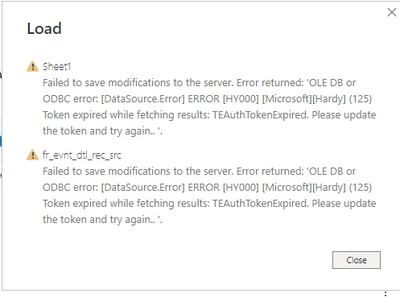
while loading 196M data to power bi desktop, getting an error- '[datassource error] error[HY000] [microsoft][hardy](125) Token expired while fetching result. TEAuthTokenExpired. please update the token and try again...'. Anyone please help me how to over come this.
Solved! Go to Solution.
Hi @Anonymous ,
I guessed right then 🙂
In Azure Databricks, there is a need to generate a token to connect to the the Hive tables.
That token has a lifetime of certain days if I am correct. You will need to re-generate the token again and give that token in Power BI Desktop in your connection settings, then the connection will refresh correctly.
Azure databricks
Hi @Anonymous ,
I guessed right then 🙂
In Azure Databricks, there is a need to generate a token to connect to the the Hive tables.
That token has a lifetime of certain days if I am correct. You will need to re-generate the token again and give that token in Power BI Desktop in your connection settings, then the connection will refresh correctly.
Thanks. Could you also please share - how do we generate a token? I only know how to connect to our Databricks tables.
Thank you, It help's.
Hi Ramba - where did you put the token when you generated it?
Join us in Barcelona for FabCon and SQLCon, the Fabric, Power BI, SQL, and AI community event. Save €200 with code FABCMTY200.
If you love stickers, then you will definitely want to check out our community sticker challenge, Barcelona edition!
Check out the July 2026 Power BI update to learn about new features.
| User | Count |
|---|---|
| 30 | |
| 28 | |
| 24 | |
| 23 | |
| 18 |
| User | Count |
|---|---|
| 44 | |
| 32 | |
| 18 | |
| 17 | |
| 16 |