Get certified for free when you join Fabric Data Days 2026 and dive into Fabric, Power BI, SQL, AI, and other essential data skills.
Join nowJuly 7 - July 17 | Round 2 of the Power BI Dataviz World Championships. Don't miss your chance! Learn more
Hi,
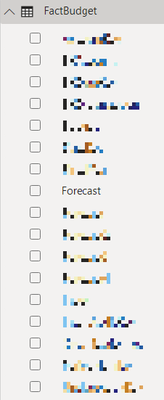
I am having an issue with my Fields pane (and all Visualizations) not recognizing any data types. For example...
There are no data field icons for any tables / fields:
This is even for fields that have defined numerical types and aggregations:
These are being explicitly shown in all visualizations (instead of aggregated) and no aggregation options are showing:
These tables were pulled into Power BI Desktop from a Dataflow in Power BI Service. Is there an additional step required to pull in or assign data types for this process?
Thank you!
Hi @BekahLoSurdo ,
Sorry for delay. I tried to reproduce your problem and imagined many possible causes before, but all failed. Recently I had another case, because a certain date column created a relationship with the date column of the calendar table, which caused its date hierarchy to disappear. So I guess whether your problem may also be caused by similar reasons. Does the field Forecast have created a relationship with a field in other table? Or did you do any operations on this field? Thank you.
Best Regards
New Field List
Hi @lbendlin,
The new preview feature did not resolve this. Thanks for checking though!
Did you enable the preview feature?
Hi @lbendlin,
I don't see a preview feature related to Dataflows. Which one are you referring to? Thanks!
Join us in Barcelona for FabCon and SQLCon, the Fabric, Power BI, SQL, and AI community event. Save €200 with code FABCMTY200.
Join Data Days 2026: 60 days of free live/on-demand sessions, challenges, study groups, and certification opportunities.
| User | Count |
|---|---|
| 26 | |
| 23 | |
| 19 | |
| 18 | |
| 15 |
| User | Count |
|---|---|
| 47 | |
| 44 | |
| 43 | |
| 35 | |
| 31 |