cancel
Showing results for 
Search instead for 
Did you mean: 

Join the FabCon + SQLCon recap series. Up next: Power BI, Real-Time Intelligence, IQ and AI, and Data Factory take center stage. All sessions are available on-demand after the live show. Register now

Reply
vijayghatti
Frequent Visitor

Data Transpose


Hello friends,


can you please help me on how to translate the data shown below


Project                     Area1                     Area2                 Area3


P100                        22500                      2200                     45000

T010                        4500                         37000                   480000


to


Area1          22500

Area2            2200

Area3            45000


filtered by Project.

6 REPLIES 6
v-yulgu-msft
Microsoft Employee
Microsoft Employee

Hi @vijayghatti,


In query editor mode, select [Project] column, then, unpivot other columns.

1.PNG


2.PNG


To filter data by project, you only need to insert column [Project] into slicer.


If you still have any question, please feel free to ask.


Best regards,
Yuliana Gu

Community Support Team _ Yuliana Gu
If this post helps, then please consider Accept it as the solution to help the other members find it more quickly.

Thank you for the help.


i was able to do the things as per the steps explained, how ever let me try to explain the senario.


i have a view which has the metadata that is required for the report and a table which has the list of projects, both are from SQL server.

now i imported the data and followed the steps as said, but i am not able to show the output in the way that was desired to be.


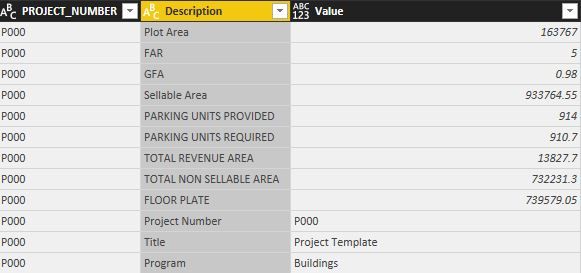
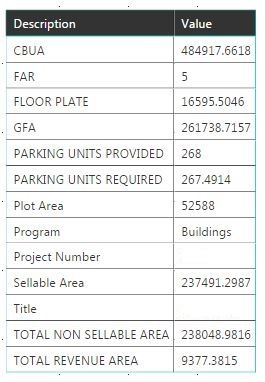
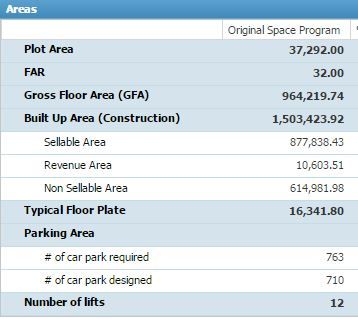
.After Un Pivot.JPGPower BI Desktop Table.JPGExpected Format.JPG


screenshot 3 is the expected format and also i need to show the percentage of values in another column.

hope this clarifies.


thanks

Vijay

Hi @vijayghatti,


So, image1 is what you get after "Unpivot" table, right? Now, you want to create a visual displayinglike image3 based on image1 table, right?


Would you please elaborate the structre of your desired output, having row group/column group, or hierarchy? And how do you want to calculate the percentage value?


Regards,
Yuliana Gu

Community Support Team _ Yuliana Gu
If this post helps, then please consider Accept it as the solution to help the other members find it more quickly.
vijayghatti
Frequent Visitor

Thanks for the quick revert.


can you please check the screenshots and help

Awaiting your screenshots...

Specializing in Power Query Formula Language (M)
MarcelBeug
Community Champion
Community Champion

In the Query Editor, choose your Project column, right-click and select "Unpivot Other Columns".

Specializing in Power Query Formula Language (M)

Helpful resources

Announcements
April Power BI Update Carousel

Power BI Monthly Update - April 2026

Check out the April 2026 Power BI update to learn about new features.

New to Fabric survey Carousel

New to Fabric Survey

If you have recently started exploring Fabric, we'd love to hear how it's going. Your feedback can help with product improvements.

Power BI DataViz World Championships carousel

Power BI DataViz World Championships - June 2026

A new Power BI DataViz World Championship is coming this June! Don't miss out on submitting your entry.

FabCon and SQLCon Highlights Carousel

FabCon &SQLCon Highlights

Experience the highlights from FabCon & SQLCon, available live and on-demand starting April 14th.