cancel
Showing results for 
Search instead for 
Did you mean: 

Get Fabric certified for FREE! Don't miss your chance! Learn more

Reply
stvcdms
Frequent Visitor

Data Refresh not seeing changes in source

I am running a query locally to an exce file that's in OneDrive. The Excel file has been updated, but the query still has a cached version of the data and isn't uploading. If I recreate the query the data is current. Clearing the cache has not resolved it.


Not sure where to go, other queries rely on this one, so I can't just recreate it. Any help would be much appreciated.

1 ACCEPTED SOLUTION
GilbertQ
Super User
Super User

Hi @stvcdms


You can clear the cache in your Power BI Desktop file. 


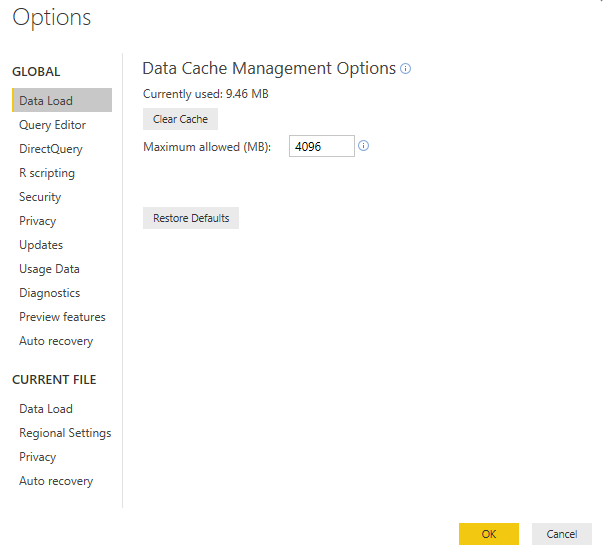
If you are in Power BI Desktop click on File and then Options

In the first list under Data Load it will show you how much data is used. You can then click on Clear Cache


Email Pic.png


Did I answer your question? Mark my post as a solution!

Proud to be a Super User!


Power BI Blog

View solution in original post

1 REPLY 1
GilbertQ
Super User
Super User

Hi @stvcdms


You can clear the cache in your Power BI Desktop file. 


If you are in Power BI Desktop click on File and then Options

In the first list under Data Load it will show you how much data is used. You can then click on Clear Cache


Email Pic.png


Did I answer your question? Mark my post as a solution!

Proud to be a Super User!


Power BI Blog

Helpful resources

Announcements
Sticker Challenge 2026 Carousel

Join our Community Sticker Challenge 2026

If you love stickers, then you will definitely want to check out our Community Sticker Challenge!

January Power BI Update Carousel

Power BI Monthly Update - January 2026

Check out the January 2026 Power BI update to learn about new features.

FabCon Atlanta 2026 carousel

FabCon Atlanta 2026

Join us at FabCon Atlanta, March 16-20, for the ultimate Fabric, Power BI, AI and SQL community-led event. Save $200 with code FABCOMM.