cancel
Showing results for 
Search instead for 
Did you mean: 

Try your skills in the Power BI Dataviz World Championship! Round one ends June 26. Join now

Reply
stvcdms
Frequent Visitor

Data Refresh not seeing changes in source

I am running a query locally to an exce file that's in OneDrive. The Excel file has been updated, but the query still has a cached version of the data and isn't uploading. If I recreate the query the data is current. Clearing the cache has not resolved it.


Not sure where to go, other queries rely on this one, so I can't just recreate it. Any help would be much appreciated.

1 ACCEPTED SOLUTION
GilbertQ
Super User
Super User

Hi @stvcdms


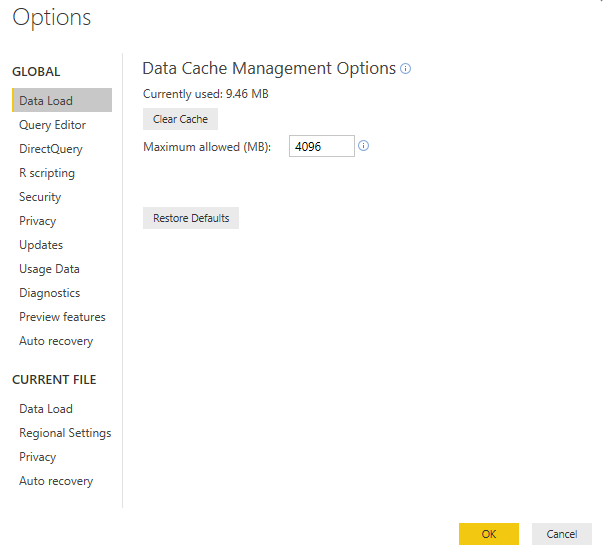
You can clear the cache in your Power BI Desktop file. 


If you are in Power BI Desktop click on File and then Options

In the first list under Data Load it will show you how much data is used. You can then click on Clear Cache


Email Pic.png


Did I answer your question? Mark my post as a solution!

Proud to be a Super User!


Power BI Blog

View solution in original post

1 REPLY 1
GilbertQ
Super User
Super User

Hi @stvcdms


You can clear the cache in your Power BI Desktop file. 


If you are in Power BI Desktop click on File and then Options

In the first list under Data Load it will show you how much data is used. You can then click on Clear Cache


Email Pic.png


Did I answer your question? Mark my post as a solution!

Proud to be a Super User!


Power BI Blog

Helpful resources

Announcements
Fabric Data Days is here Carousel

Data Days 2026

Don't miss out on Data Days, June 15 through August 7. Learn Fabric, Power BI, SQL, AI and more.

May Power BI Update Carousel

Power BI Monthly Update - May 2026

Check out the May 2026 Power BI update to learn about new features.

Power BI DataViz World Championships carousel

Power BI DataViz World Championships - June 2026

A new Power BI DataViz World Championship is coming this June! Don't miss out on submitting your entry.