Join us at FabCon Atlanta from March 16 - 20, 2026, for the ultimate Fabric, Power BI, AI and SQL community-led event. Save $200 with code FABCOMM.
Register now!Learn from the best! Meet the four finalists headed to the FINALS of the Power BI Dataviz World Championships! Register now
Hi Community.
In Excel, I can create a formula to give a result on ranges between certain values e.g.
=IF(AND(A2>=0, A2<= 100), "Answer A",IF(AND(A2>=101, A2<=500),"Answer B", IF(AND(A2>=501, A2<=1000),"Answer 3", "Void")))
Is there a Dax equivalent, so I can get this to work directly in Power BI when importing and combining several spreadsheets (the If, And doesn't work)
Solved! Go to Solution.
Hi @mjustintaylor ,
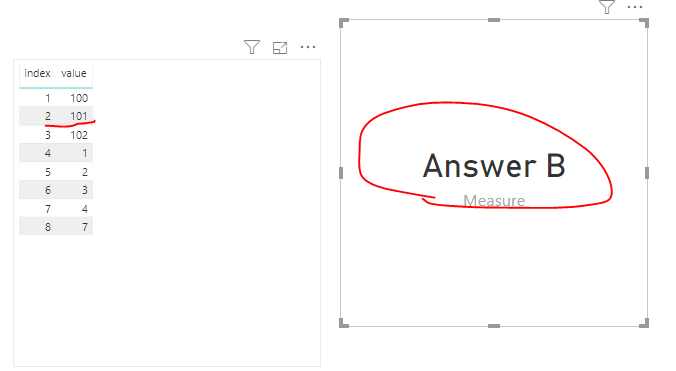
We should get the A2 by VAR like this.
Measure =
VAR A2 =
CALCULATE ( SUM ( 'Table'[value] ), FILTER ( 'Table', 'Table'[index] = 2 ) )
RETURN
IF (
AND ( A2 >= 0, A2 <= 100 ),
"Answer A",
IF (
AND ( A2 >= 101, A2 <= 500 ),
"Answer B",
IF ( AND ( A2 >= 501, A2 <= 1000 ), "Answer 3", "Void" )
)
)
Hi @mjustintaylor ,
We should get the A2 by VAR like this.
Measure =
VAR A2 =
CALCULATE ( SUM ( 'Table'[value] ), FILTER ( 'Table', 'Table'[index] = 2 ) )
RETURN
IF (
AND ( A2 >= 0, A2 <= 100 ),
"Answer A",
IF (
AND ( A2 >= 101, A2 <= 500 ),
"Answer B",
IF ( AND ( A2 >= 501, A2 <= 1000 ), "Answer 3", "Void" )
)
)
Hello @mjustintaylor
Have you tried :
= IF(A2>=0 && A2 <=100,"Answer A","Answer B") or another combinations.
IF first option && IF second option, than ...
Andrej
Thanks, Andrej
I will give this a go.
KRs
Justin
Share feedback directly with Fabric product managers, participate in targeted research studies and influence the Fabric roadmap.
Check out the February 2026 Power BI update to learn about new features.
| User | Count |
|---|---|
| 53 | |
| 51 | |
| 39 | |
| 15 | |
| 14 |
| User | Count |
|---|---|
| 95 | |
| 78 | |
| 34 | |
| 28 | |
| 25 |