Join us at FabCon Atlanta from March 16 - 20, 2026, for the ultimate Fabric, Power BI, AI and SQL community-led event. Save $200 with code FABCOMM.
Register now!View all the Fabric Data Days sessions on demand. View schedule
Hi Community.
In Excel, I can create a formula to give a result on ranges between certain values e.g.
=IF(AND(A2>=0, A2<= 100), "Answer A",IF(AND(A2>=101, A2<=500),"Answer B", IF(AND(A2>=501, A2<=1000),"Answer 3", "Void")))
Is there a Dax equivalent, so I can get this to work directly in Power BI when importing and combining several spreadsheets (the If, And doesn't work)
Solved! Go to Solution.
Hi @mjustintaylor ,
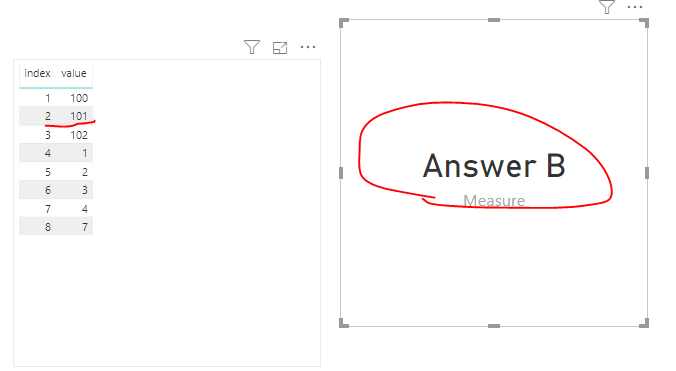
We should get the A2 by VAR like this.
Measure =
VAR A2 =
CALCULATE ( SUM ( 'Table'[value] ), FILTER ( 'Table', 'Table'[index] = 2 ) )
RETURN
IF (
AND ( A2 >= 0, A2 <= 100 ),
"Answer A",
IF (
AND ( A2 >= 101, A2 <= 500 ),
"Answer B",
IF ( AND ( A2 >= 501, A2 <= 1000 ), "Answer 3", "Void" )
)
)
Hi @mjustintaylor ,
We should get the A2 by VAR like this.
Measure =
VAR A2 =
CALCULATE ( SUM ( 'Table'[value] ), FILTER ( 'Table', 'Table'[index] = 2 ) )
RETURN
IF (
AND ( A2 >= 0, A2 <= 100 ),
"Answer A",
IF (
AND ( A2 >= 101, A2 <= 500 ),
"Answer B",
IF ( AND ( A2 >= 501, A2 <= 1000 ), "Answer 3", "Void" )
)
)
Hello @mjustintaylor
Have you tried :
= IF(A2>=0 && A2 <=100,"Answer A","Answer B") or another combinations.
IF first option && IF second option, than ...
Andrej
Thanks, Andrej
I will give this a go.
KRs
Justin
Check out the November 2025 Power BI update to learn about new features.
Advance your Data & AI career with 50 days of live learning, contests, hands-on challenges, study groups & certifications and more!