cancel
Showing results for 
Search instead for 
Did you mean: 

July 7 - July 17 | Round 2 of the Power BI Dataviz World Championships. Don't miss your chance! Learn more

Reply
DerekTrujillo
Frequent Visitor

Data - JSON - Lists - Records

I have an issue that seems really similar to others, but I can't seem to get to the results I want.

I am trying to create a Power BI report based on data in a Sharepoint List.  The data is timesheet information: Employee, approver, time period, number of hours...etc. 

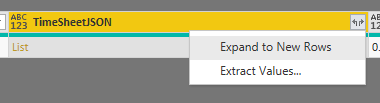
I am able to pull in the data, but it appears the details are in a JSON field - I was able to parse the JSON, but the result is now a 'List' and my options are to Expand to New Rows or Extract Values:Image 1Image 1


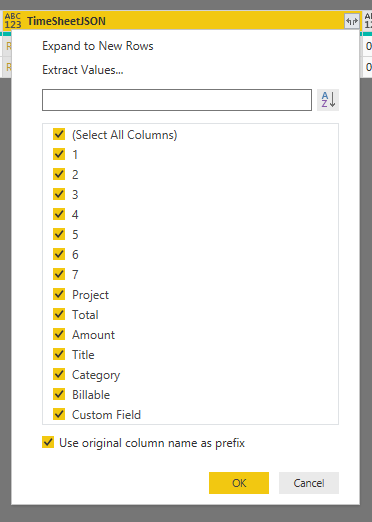
If I expand to New Rows – I now have two rows with duplicated data. Except the TimeSheetJSON field now has a type of ‘Record’ and my options there are Expand to New Rows or Extract Values:The values here are: 1 – 7 (These are the day number of the week that contain the hours for each day). Ideally these would be dates (I can derive this as there is a week-starting date) The remaining 7 fields are information about the hours – which projects and category they are associated with and if they are billable hours…etc.) I would need all of these fields available. Image 2Image 2


What I need to get to is a point where I can retrieve all the data in a meaningful way Seems parent-child / header-detail method would work – if there were a ‘key’ on the detailed record/list.  Something like this (?):
Header:
Record ID | Employee Name | Supervisor Name | Timesheet Status | Total Hours | …
Detail:
Parent Record ID | Work Date | Project | Hours | …

I can SEE the data I need, but want to get this data into a format where I can report on it and to ensure this is repeatable for other timesheets that come in.

3 REPLIES 3
v-yulgu-msft
Microsoft Employee
Microsoft Employee

Hi @DerekTrujillo ,


Choose that list column, click "To table" butter under transform tab.


Best regards,

Yuliana Gu

Community Support Team _ Yuliana Gu
If this post helps, then please consider Accept it as the solution to help the other members find it more quickly.

I think the problem is that there are more than one record in the list and even if I save them as a table - I loose any key attributes to join back to the original data.  This also needs to be on-going / repeatable for other data coming in.  Sometimes there will be 2 records in the list, sometimes 5, sometimes 3...etc. 

Hi,


Any updates on this? Could you deal with this problem?


Thanks,


Ricardo

Helpful resources

Announcements
FabCon and SQLCon Barcelona 2026

FabCon & SQLCon – Barcelona 2026

Join us in Barcelona for FabCon and SQLCon, the Fabric, Power BI, SQL, and AI community event. Save €200 with code FABCMTY200.

60 days of Data Days Carousel

Data Days 2026

Join Fabric Data Days 2026: 60 days of free live/on-demand sessions, challenges, study groups, and certification opportunities.

Power BI DataViz World Championships carousel

Power BI DataViz World Championships - June 2026

A new Power BI DataViz World Championship is coming this June! Don't miss out on submitting your entry.