Get Fabric certified for FREE!
Don't miss your chance to take the Fabric Data Engineer (DP-700) exam on us!
Learn more- Power BI forums
- Get Help with Power BI
- Desktop
- Service
- Report Server
- Power Query
- Mobile Apps
- Developer
- DAX Commands and Tips
- Custom Visuals Development Discussion
- Health and Life Sciences
- Power BI Spanish forums
- Translated Spanish Desktop
- Training and Consulting
- Instructor Led Training
- Dashboard in a Day for Women, by Women
- Galleries
- Data Stories Gallery
- Themes Gallery
- Contests Gallery
- QuickViz Gallery
- Quick Measures Gallery
- Visual Calculations Gallery
- Notebook Gallery
- Translytical Task Flow Gallery
- TMDL Gallery
- R Script Showcase
- Webinars and Video Gallery
- Ideas
- Custom Visuals Ideas (read-only)
- Issues
- Issues
- Events
- Upcoming Events
Next up in the FabCon + SQLCon recap series: The roadmap for Microsoft SQL and Maximizing Developer experiences in Fabric. All sessions are available on-demand after the live show. Register now
- Power BI forums
- Forums
- Get Help with Power BI
- Desktop
- Re: Data Download from Website
- Subscribe to RSS Feed
- Mark Topic as New
- Mark Topic as Read
- Float this Topic for Current User
- Bookmark
- Subscribe
- Printer Friendly Page


- Mark as New
- Bookmark
- Subscribe
- Mute
- Subscribe to RSS Feed
- Permalink
- Report Inappropriate Content
Data Download from Website
Hi,
I usually run a report on a website and download that as a excel file. I can see the table in the webpage. How do i connect that website to Power BI. I tried copying in the URL but doens't work. I'm I missing any steps?
Thanks

- Mark as New
- Bookmark
- Subscribe
- Mute
- Subscribe to RSS Feed
- Permalink
- Report Inappropriate Content
If you have Power Automate Desktop and access to a spare computer or virtual machine, then you could try the set-up I explain here:


- Mark as New
- Bookmark
- Subscribe
- Mute
- Subscribe to RSS Feed
- Permalink
- Report Inappropriate Content
@drallam wrote:
Hi,
I usually run a report on a website and download that as a excel file. I can see the table in the webpage. How do i connect that website to Power BI. I tried copying in the URL but doens't work. I'm I missing any steps?
Thanks
My guess is that probably you can't simply get the data from the "table" via the "get data"->"other"->"web" with the report site url. Two questions,
- Is there any authentication when login the report site before running the report?
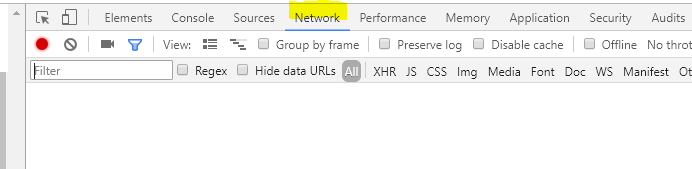
- What is the underlying request when clicking on "run the report"? You could probably get data from the actually request url(In Chrome, press F12 to enter developer console, select network tab and then click "run the report" button) instead of the report page.
- Mark as New
- Bookmark
- Subscribe
- Mute
- Subscribe to RSS Feed
- Permalink
- Report Inappropriate Content
Hi Eric,
- Yes there is an authentication to access the data before running the report.
- The idea is to exprot that data to an excel file after running the report. And I load that to power BI. I was wondering if there a way to directly pull that data. Or what would be the ideal workflow to do it would be the greater question.
- Mark as New
- Bookmark
- Subscribe
- Mute
- Subscribe to RSS Feed
- Permalink
- Report Inappropriate Content
@drallam wrote:
Hi Eric,
- Yes there is an authentication to access the data before running the report.
- The idea is to exprot that data to an excel file after running the report. And I load that to power BI. I was wondering if there a way to directly pull that data. Or what would be the ideal workflow to do it would be the greater question.
I'd say it depends on your report app. If you can get the correlated API loading data, you may call that API directly to get data in Power BI.


- Mark as New
- Bookmark
- Subscribe
- Mute
- Subscribe to RSS Feed
- Permalink
- Report Inappropriate Content
Try entering the URL into a Web query and using the visualize page option to select the table?
Follow on LinkedIn
@ me in replies or I'll lose your thread!!!
Instead of a Kudo, please vote for this idea
Become an expert!: Enterprise DNA
External Tools: MSHGQM
YouTube Channel!: Microsoft Hates Greg
Latest book!: DAX For Humans
DAX is easy, CALCULATE makes DAX hard...
- Mark as New
- Bookmark
- Subscribe
- Mute
- Subscribe to RSS Feed
- Permalink
- Report Inappropriate Content
Where do i see that option.
- Mark as New
- Bookmark
- Subscribe
- Mute
- Subscribe to RSS Feed
- Permalink
- Report Inappropriate Content
Get data | Web. After you enter the URL you should get a dialog with the Document and any tables listed. You can then click on the "Web View" tab at the top to see the web page and it should highlight the tables and allow you to checkmark the ones that you want to import.
Follow on LinkedIn
@ me in replies or I'll lose your thread!!!
Instead of a Kudo, please vote for this idea
Become an expert!: Enterprise DNA
External Tools: MSHGQM
YouTube Channel!: Microsoft Hates Greg
Latest book!: DAX For Humans
DAX is easy, CALCULATE makes DAX hard...


- Mark as New
- Bookmark
- Subscribe
- Mute
- Subscribe to RSS Feed
- Permalink
- Report Inappropriate Content

Helpful resources

New to Fabric Survey
If you have recently started exploring Fabric, we'd love to hear how it's going. Your feedback can help with product improvements.

Power BI DataViz World Championships - June 2026
A new Power BI DataViz World Championship is coming this June! Don't miss out on submitting your entry.

Join our Fabric User Panel
Share feedback directly with Fabric product managers, participate in targeted research studies and influence the Fabric roadmap.

Power BI Community Update - March 2026
Check out the March 2026 Power BI update to learn about new features.

| User | Count |
|---|---|
| 49 | |
| 44 | |
| 42 | |
| 19 | |
| 18 |


| User | Count |
|---|---|
| 74 | |
| 71 | |
| 34 | |
| 33 | |
| 31 |


