This time we’re going bigger than ever. Fabric, Power BI, SQL, AI and more. We're covering it all. You won't want to miss it.
Learn moreLevel up your Power BI skills this month - build one visual each week and tell better stories with data! Get started
Hi
I'm trying to figure out how to calculate daily changes (delta) in a time series. At the same time I need to be able to handle missing days and setting the value to zero on those days, and on the last day I also need to set the value to zero.
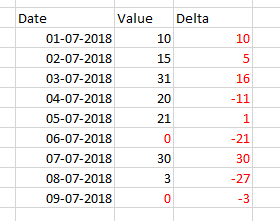
Here is an example of what a want to achieve:
In my dataset I have the black figures and I want to calculate the red ones. When setting Value = 0 in the end I only want a number on the first day after the last observation i.e. I only want numbers on 09-07-2018 and not 10-07-2018, 11-07-2018 etc.
The calculation needs to be applied on a trade level basis on a datasset of hundreds of trades.
Thanks in advance.
Solved! Go to Solution.
Hi @lapa44 -
Without see a sample of the data, I'm making a few assumptions. If the dates with blanks are in your data set then you can use a find and replace to change the null values to zero in the query window. If there are specific days where you need the data to be 0, then you can create a seperate date table and merge with your fact table and create a conditional column to set the specific dates to 0
In terms of the delta change.. You can download a sample file here..
https://drive.google.com/file/d/14GpDdpFTgDL5NV73vHU7P20mJxVCxHPD/view?usp=sharing
Hope this helps.
D
Hi @lapa44,
The solution of davehu should close your case.
If you have solved your problem, please always accept the replies making sense as solution to your question so that people who may have the same question can get the solution directly.
If you still need help, please feel free to ask.
Best Regards,
Cherry
Hi @lapa44 -
Without see a sample of the data, I'm making a few assumptions. If the dates with blanks are in your data set then you can use a find and replace to change the null values to zero in the query window. If there are specific days where you need the data to be 0, then you can create a seperate date table and merge with your fact table and create a conditional column to set the specific dates to 0
In terms of the delta change.. You can download a sample file here..
https://drive.google.com/file/d/14GpDdpFTgDL5NV73vHU7P20mJxVCxHPD/view?usp=sharing
Hope this helps.
D
How are you, brother @davehus
I saw your solution to the problem and I liked it, but I had a problem with the my data, which is that each date is repeated three times because of the column of Status I hope you help me plz
Country Last_Update Incident_Rate Status Cases_Number Previous Last_Update
| Spain | 04/16/2020 | 395.570224334054 | Recovered | 04/15/2020 | |
| Spain | 04/16/2020 | 395.570224334054 | Active | 184948 | 04/15/2020 |
| Spain | 04/16/2020 | 395.570224334054 | Delta_Confirmed | 7304 | 04/15/2020 |
| Spain | 04/16/2020 | 395.570224334054 | Deaths | 19315 | 04/15/2020 |
| Spain | 04/15/2020 | 379.948293204569 | Recovered | 04/14/2020 | |
| Spain | 04/15/2020 | 379.948293204569 | Active | 177644 | 04/14/2020 |
| Spain | 04/15/2020 | 379.948293204569 | Delta_Confirmed | 5103 | 04/14/2020 |
| Spain | 04/15/2020 | 379.948293204569 | Deaths | 18708 | 04/14/2020 |
Check out the April 2026 Power BI update to learn about new features.
Sign up to receive a private message when registration opens and key events begin.
If you have recently started exploring Fabric, we'd love to hear how it's going. Your feedback can help with product improvements.
| User | Count |
|---|---|
| 36 | |
| 32 | |
| 26 | |
| 24 | |
| 17 |
| User | Count |
|---|---|
| 70 | |
| 50 | |
| 31 | |
| 26 | |
| 22 |