Join us at FabCon Atlanta from March 16 - 20, 2026, for the ultimate Fabric, Power BI, AI and SQL community-led event. Save $200 with code FABCOMM.
Register now!The Power BI Data Visualization World Championships is back! Get ahead of the game and start preparing now! Learn more
Hi,
For instance I have a table like this:
| Customer | Cust ID | Type | Sales |
| A | 11 | Platinum | 100 |
| A | 11 | Gold | 20 |
| A | 11 | 300 | |
| B | 12 | Silver | 200 |
| C | 13 | Gold | 100 |
| C | 13 | Silver | 400 |
| D | 14 | Platinum | 600 |
Now I need to show in a card or some box the type of Customers:
Eg: If i select a customer name using the select box then ideally my result should be:
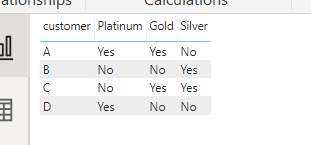
| Customer | Platinum | Gold | Silver |
| A | Yes | Yes | No |
I belive we should use DAX query to get the result. Please advice
Solved! Go to Solution.
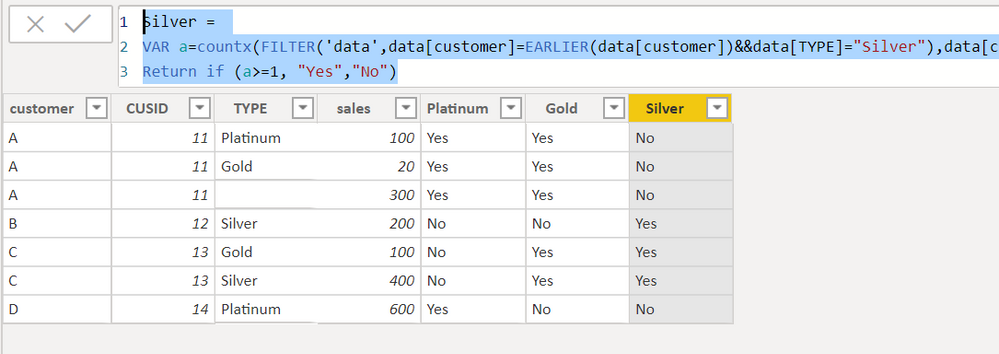
You can create three columns.
Platinum =
VAR a=countx(FILTER('data',data[customer]=EARLIER(data[customer])&&data[TYPE]="Platinum"),data[customer])
Return if (a>=1, "Yes","No")Gold =
VAR a=countx(FILTER('data',data[customer]=EARLIER(data[customer])&&data[TYPE]="Gold"),data[customer])
Return if (a>=1, "Yes","No")Silver =
VAR a=countx(FILTER('data',data[customer]=EARLIER(data[customer])&&data[TYPE]="Silver"),data[customer])
Return if (a>=1, "Yes","No")Proud to be a Super User!
You can create three columns.
Platinum =
VAR a=countx(FILTER('data',data[customer]=EARLIER(data[customer])&&data[TYPE]="Platinum"),data[customer])
Return if (a>=1, "Yes","No")Gold =
VAR a=countx(FILTER('data',data[customer]=EARLIER(data[customer])&&data[TYPE]="Gold"),data[customer])
Return if (a>=1, "Yes","No")Silver =
VAR a=countx(FILTER('data',data[customer]=EARLIER(data[customer])&&data[TYPE]="Silver"),data[customer])
Return if (a>=1, "Yes","No")Proud to be a Super User!
This solution works fine with one exception.
The result comes as:
Customer Platinum Gold Silver
A Platinum Gold No
instead of
Customer Platinum Gold Silver
A Yes Yes No
The Power BI Data Visualization World Championships is back! Get ahead of the game and start preparing now!
| User | Count |
|---|---|
| 37 | |
| 37 | |
| 33 | |
| 32 | |
| 29 |
| User | Count |
|---|---|
| 130 | |
| 88 | |
| 82 | |
| 68 | |
| 64 |