Join us at FabCon Atlanta from March 16 - 20, 2026, for the ultimate Fabric, Power BI, AI and SQL community-led event. Save $200 with code FABCOMM.
Register now!The Power BI Data Visualization World Championships is back! It's time to submit your entry. Live now!
Hi,
For instance I have a table like this:
| Customer | Cust ID | Type | Sales |
| A | 11 | Platinum | 100 |
| A | 11 | Gold | 20 |
| A | 11 | 300 | |
| B | 12 | Silver | 200 |
| C | 13 | Gold | 100 |
| C | 13 | Silver | 400 |
| D | 14 | Platinum | 600 |
Now I need to show in a card or some box the type of Customers:
Eg: If i select a customer name using the select box then ideally my result should be:
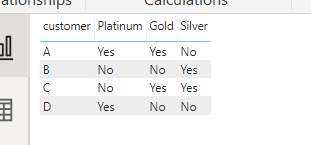
| Customer | Platinum | Gold | Silver |
| A | Yes | Yes | No |
I belive we should use DAX query to get the result. Please advice
Solved! Go to Solution.
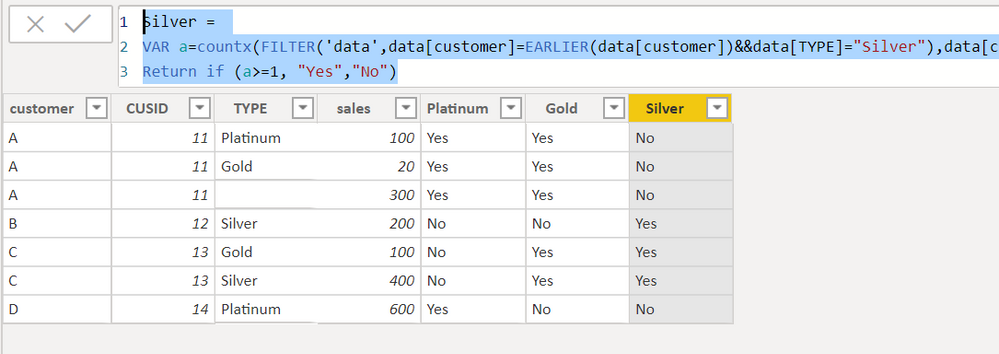
You can create three columns.
Platinum =
VAR a=countx(FILTER('data',data[customer]=EARLIER(data[customer])&&data[TYPE]="Platinum"),data[customer])
Return if (a>=1, "Yes","No")Gold =
VAR a=countx(FILTER('data',data[customer]=EARLIER(data[customer])&&data[TYPE]="Gold"),data[customer])
Return if (a>=1, "Yes","No")Silver =
VAR a=countx(FILTER('data',data[customer]=EARLIER(data[customer])&&data[TYPE]="Silver"),data[customer])
Return if (a>=1, "Yes","No")Proud to be a Super User!
You can create three columns.
Platinum =
VAR a=countx(FILTER('data',data[customer]=EARLIER(data[customer])&&data[TYPE]="Platinum"),data[customer])
Return if (a>=1, "Yes","No")Gold =
VAR a=countx(FILTER('data',data[customer]=EARLIER(data[customer])&&data[TYPE]="Gold"),data[customer])
Return if (a>=1, "Yes","No")Silver =
VAR a=countx(FILTER('data',data[customer]=EARLIER(data[customer])&&data[TYPE]="Silver"),data[customer])
Return if (a>=1, "Yes","No")Proud to be a Super User!
This solution works fine with one exception.
The result comes as:
Customer Platinum Gold Silver
A Platinum Gold No
instead of
Customer Platinum Gold Silver
A Yes Yes No
The Power BI Data Visualization World Championships is back! It's time to submit your entry.
Check out the January 2026 Power BI update to learn about new features.
| User | Count |
|---|---|
| 56 | |
| 42 | |
| 40 | |
| 21 | |
| 20 |
| User | Count |
|---|---|
| 142 | |
| 105 | |
| 63 | |
| 36 | |
| 35 |